
To get a file name without the extension in PowerShell, read the BaseName property of the file. Get-Item and Get-ChildItem both return it:
(Get-Item -Path C:\Reports\sales-2026-10.csv).BaseNameFor a path that’s only text, use [System.IO.Path]::GetFileNameWithoutExtension(). Below I compare the methods, show the edge cases that trip people up and handle whole folders.
Use the BaseName property
BaseName is the name without the extension, and Extension holds the part that was removed:
$file = Get-Item -Path .\Reports\sales-2026-10.csv
$file.BaseName
$file.Extension
Output:
sales-2026-10
.csv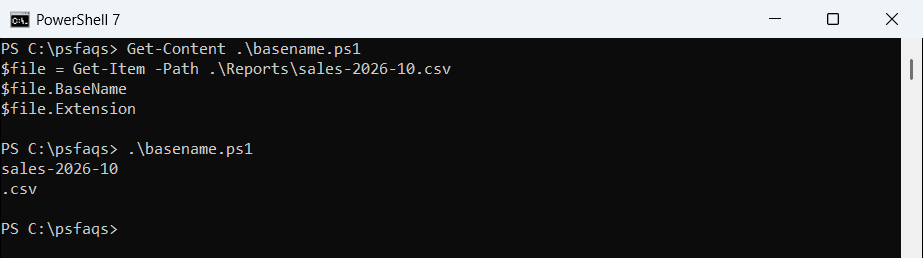
Get-Item fails if the file doesn’t exist, so BaseName only works for real files. That’s useful when you want to be sure the file is there.
Use GetFileNameWithoutExtension for a path string
The .NET method works on any text that looks like a path, even a URL. The file doesn’t need to exist:
[System.IO.Path]::GetFileNameWithoutExtension('C:\Reports\sales-2026-10.csv')
[System.IO.Path]::GetFileNameWithoutExtension('https://contoso.com/files/invoice-7001.pdf')
Output:
sales-2026-10
invoice-7001
It works the same in PowerShell 7 and Windows PowerShell 5.1.
Split-Path -LeafBase in PowerShell 7
PowerShell 6 added -LeafBase to Split-Path. It returns sales-2026-10 in PowerShell 7, but Windows PowerShell 5.1 doesn’t know the parameter:
try { Split-Path -Path 'C:\Reports\sales-2026-10.csv' -LeafBase -ErrorAction Stop }
catch { "Failed. $($_.Exception.Message)" }
Output:
sales-2026-10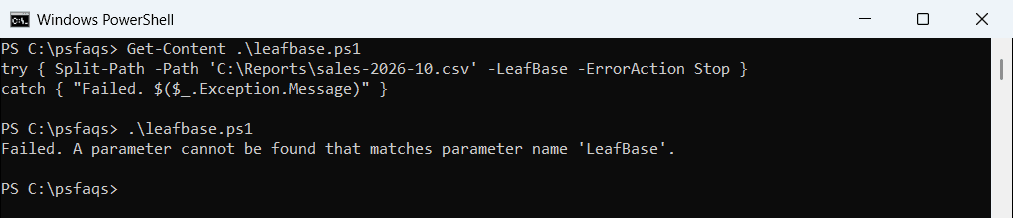
For scripts that must run in both versions, use the .NET method instead. Split-Path also has -Extension in PowerShell 7.
Edge cases: several dots, .tar.gz and dot files
Only the last extension is removed. Watch the last two rows:
foreach ($name in 'report.2026.10.final.xlsx', 'backup-2026-10.tar.gz', '.env', 'README') {
    '{0,-26} -> [{1}]' -f $name, [System.IO.Path]::GetFileNameWithoutExtension($name)
}
Output:
report.2026.10.final.xlsx  -> [report.2026.10.final]
backup-2026-10.tar.gz      -> [backup-2026-10.tar]
.env                       -> []
README                     -> [README]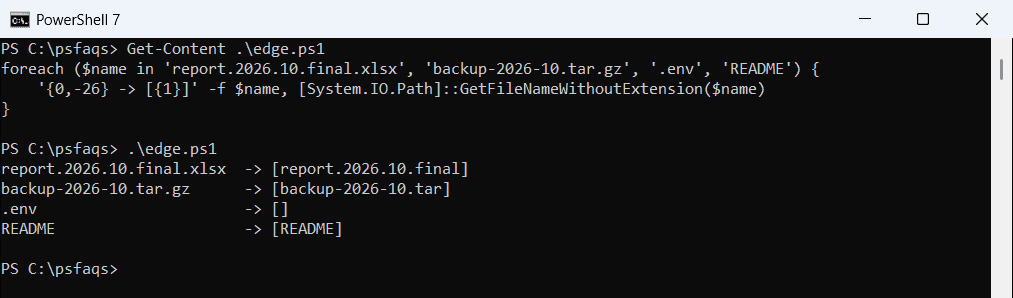
.env has no name before the dot, so the result is empty. README has no extension, so it comes back unchanged. Check for an empty result before you build a new name from it.
Remove every extension
To turn backup-2026-10.tar.gz into backup-2026-10, cut at the first dot:
'backup-2026-10.tar.gz' -replace '\..*$'
('backup-2026-10.tar.gz' -split '\.')[0]
Output:
backup-2026-10
backup-2026-10
Only do this when your names have no other dots. For report.2026.10.final.xlsx, it would cut too much.
Get names without extensions for a whole folder
BaseName is a property of every file Get-ChildItem returns, so you can select it directly:
Get-ChildItem -Path .\Reports -File | Select-Object -Property Name, BaseNameOutput:
Name              BaseName
----              --------
budget-2026.xlsx  budget-2026
q3-review.docx    q3-review
sales-2026-10.csv sales-2026-10
For more ways to list names, see listing file names only and getting a file name from a path.
Change the extension instead
If you’re getting the base name only to add a new extension, ChangeExtension does it in one step:
[System.IO.Path]::ChangeExtension('C:\Reports\sales-2026-10.csv', '.xlsx')Output:
C:\Reports\sales-2026-10.xlsxThis only changes the text. Use Rename-Item to rename the actual file, as shown in copying and renaming files.
Frequently Asked Questions
How do I get a file name without the extension in PowerShell?
Use (Get-Item -Path .\file.csv).BaseName, or [System.IO.Path]::GetFileNameWithoutExtension($path) for a path string.
Does Split-Path -LeafBase work in PowerShell 5.1?
No. -LeafBase was added in PowerShell 6. Use the .NET GetFileNameWithoutExtension method in 5.1.
How do I remove a double extension like .tar.gz?
Use $name -replace '\..*$', which cuts at the first dot. Only do this when the name has no other dots.
Why is the base name of .env empty?
The whole name is treated as the extension, so nothing is left before the dot.
How do I get base names for all files in a folder?
Run Get-ChildItem -Path C:\Reports -File | Select-Object Name, BaseName. See Microsoft’s