
To convert a UTF-16 file to UTF-8 with PowerShell, read it with Get-Content and write it back with Set-Content -Encoding utf8:
Get-Content -Path .\orders-utf16.csv | Set-Content -Path .\orders-utf8.csv -Encoding utf8Get-Content recognizes UTF-16 by itself. The catch is the byte order mark: PowerShell 7 writes UTF-8 without one, and Windows PowerShell 5.1 adds it. Below I show the real bytes, a version that behaves the same everywhere, and a whole-folder conversion.
Check whether a file is UTF-16
UTF-16 files usually start with a byte order mark (BOM): FF FE for the common little-endian kind. This helper prints the first three bytes, and every example below uses it:
function Get-FirstBytes ($Path) { ([System.IO.File]::ReadAllBytes((Resolve-Path $Path)) | Select-Object -First 3 | ForEach-Object { '{0:X2}' -f $_ }) -join ' ' }My sample CSV has accented city and product names, which is where encoding problems show up:
function Get-FirstBytes ($Path) { ([System.IO.File]::ReadAllBytes((Resolve-Path $Path)) | Select-Object -First 3 | ForEach-Object { '{0:X2}' -f $_ }) -join ' ' }

$file = Get-Item -Path .\Encoding\orders-utf16.csv
"First bytes: $(Get-FirstBytes $file.FullName)"
"Size:        $($file.Length) bytes"
Get-Content -Path $file.FullName
Output:
First bytes: FF FE 4F
Size:        118 bytes
Order,City,Item
ORD-8001,San José,Café espresso machine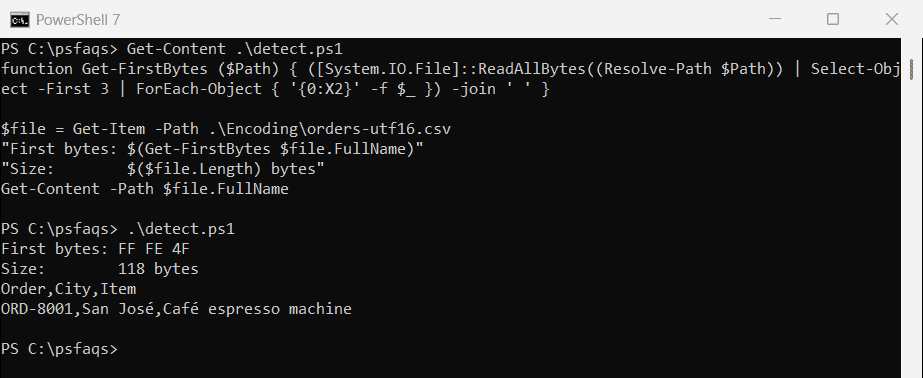
UTF-16 uses at least two bytes per character, so this 58-character file takes 118 bytes. FE FF instead means big-endian UTF-16, which Get-Content also reads. To turn raw bytes back into text, see converting a byte array to a string.
Convert with Get-Content and Set-Content
Here’s the conversion with the bytes checked afterward:
function Get-FirstBytes ($Path) { ([System.IO.File]::ReadAllBytes((Resolve-Path $Path)) | Select-Object -First 3 | ForEach-Object { '{0:X2}' -f $_ }) -join ' ' }

Get-Content -Path .\Encoding\orders-utf16.csv |
    Set-Content -Path .\Encoding\orders-utf8.csv -Encoding utf8

"First bytes: $(Get-FirstBytes .\Encoding\orders-utf8.csv)"
"Size:        $((Get-Item -Path .\Encoding\orders-utf8.csv).Length) bytes"
Output:
First bytes: 4F 72 64
Size:        60 bytes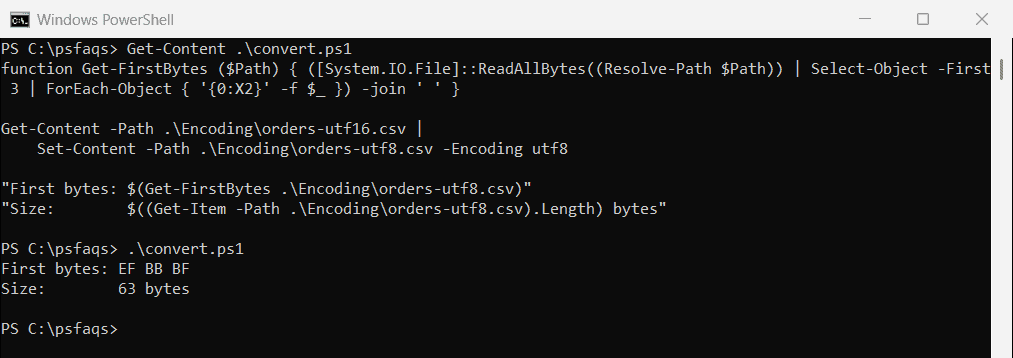
PowerShell 7 writes plain UTF-8, starting with the letter O (4F). Windows PowerShell 5.1 starts the file with EF BB BF and is 3 bytes bigger. Most apps accept either, but some Linux tools, web APIs and CSV importers choke on the BOM.
In PowerShell 7 you can choose: -Encoding utf8BOM adds the mark and utf8NoBOM leaves it out. The same parameter works when you write a string to a file.
UTF-8 without a BOM in Windows PowerShell 5.1
5.1 has no utf8NoBOM option, so use .NET directly. UTF8Encoding with $false means no BOM, and the result is the same in both versions:
function Get-FirstBytes ($Path) { ([System.IO.File]::ReadAllBytes((Resolve-Path $Path)) | Select-Object -First 3 | ForEach-Object { '{0:X2}' -f $_ }) -join ' ' }

$source = (Resolve-Path -Path .\Encoding\orders-utf16.csv).Path
$target = Join-Path -Path (Split-Path -Path $source) -ChildPath 'orders-utf8.csv'

$text = [System.IO.File]::ReadAllText($source)              # detects the UTF-16 BOM
[System.IO.File]::WriteAllText($target, $text, [System.Text.UTF8Encoding]::new($false))

"First bytes: $(Get-FirstBytes $target)"
"Same text:   $([System.IO.File]::ReadAllText($target) -eq $text)"
Output:
First bytes: 4F 72 64
Same text:   True
Read BOM-less UTF-8 correctly in 5.1
There’s a catch on the way back. Windows PowerShell 5.1 assumes ANSI for files without a BOM, so accented letters come out garbled unless you add -Encoding UTF8:
$path = (Resolve-Path -Path .\Encoding\orders-utf16.csv).Path
$target = $path.Replace('utf16', 'utf8')
[System.IO.File]::WriteAllText($target, [System.IO.File]::ReadAllText($path), [System.Text.UTF8Encoding]::new($false))

(Get-Content -Path $target)[1]
(Get-Content -Path $target -Encoding UTF8)[1]
Output:
ORD-8001,San José,Café espresso machine
ORD-8001,San José,Café espresso machine
That’s the PowerShell 7 output, where both lines are correct. In 5.1 the first line shows San José and Café, and only the second line is right.
ReadAllText detects the UTF-16 BOM, so the text arrives intact. Use full paths with .NET methods, because .NET doesn’t follow PowerShell’s current folder. To process the text afterward, see reading a file line by line.
Convert every UTF-16 file in a folder
Check the first bytes so files that are already UTF-8 are left alone:
$utf8 = [System.Text.UTF8Encoding]::new($false)
foreach ($file in Get-ChildItem -Path .\Encoding\Exports -Filter *.csv) {
    $bytes = [System.IO.File]::ReadAllBytes($file.FullName)
    $isUtf16 = $bytes.Length -ge 2 -and (($bytes[0] -eq 0xFF -and $bytes[1] -eq 0xFE) -or ($bytes[0] -eq 0xFE -and $bytes[1] -eq 0xFF))
    if ($isUtf16) {
        [System.IO.File]::WriteAllText($file.FullName, [System.IO.File]::ReadAllText($file.FullName), $utf8)
        "Converted: $($file.Name)"
    }
    else { "Skipped:   $($file.Name) (not UTF-16)" }
}
Output:
Converted: austin.csv
Converted: denver.csv
Skipped:   seattle.csv (not UTF-16)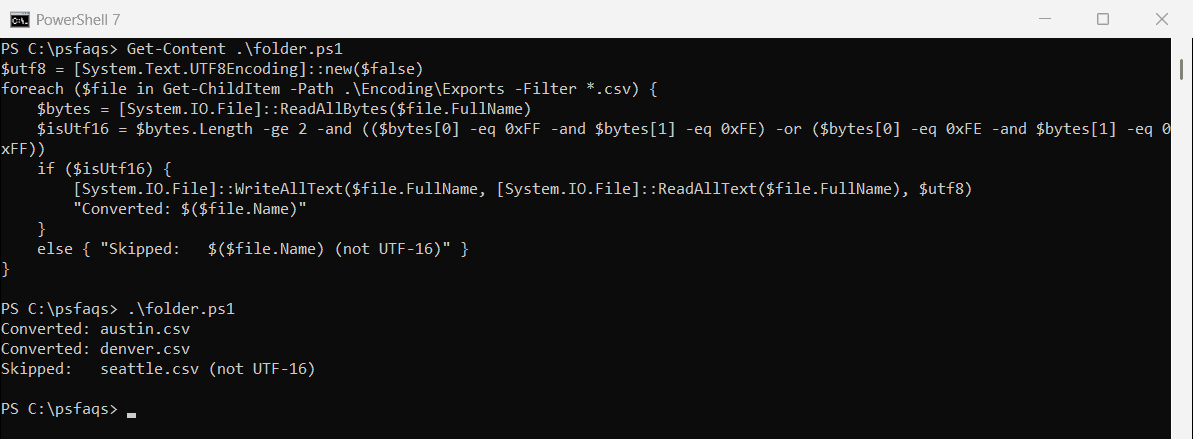
Copy the folder first if the files matter. For looping through folders in general, see PowerShell foreach file in a folder.
Where UTF-16 files come from
Often from PowerShell itself. In Windows PowerShell 5.1, Out-File and the > operator write UTF-16 by default:
function Get-FirstBytes ($Path) { ([System.IO.File]::ReadAllBytes((Resolve-Path $Path)) | Select-Object -First 3 | ForEach-Object { '{0:X2}' -f $_ }) -join ' ' }

'Report for Austin' | Out-File -FilePath .\Encoding\report.txt
"Out-File wrote: $(Get-FirstBytes .\Encoding\report.txt)"
Output:
Out-File wrote: 52 65 70PowerShell 7 wrote 52 (the letter R) with no BOM, while 5.1 wrote FF FE. Add -Encoding utf8 in 5.1 scripts to avoid creating UTF-16 files. More in PowerShell Out-File.
To control whether the output gets a BOM in both PowerShell 7 and 5.1, see