
To convert JSON to CSV in PowerShell, read the file as one string, turn it into objects with ConvertFrom-Json, and save them with Export-Csv:
(Get-Content -Path .\employees.json -Raw | ConvertFrom-Json) | Export-Csv -Path .\employees.csv -NoTypeInformationThat works for flat JSON. Nested objects, dates and records with different fields need a little more, so I tested each case in PowerShell 7 and Windows PowerShell 5.1.
Convert a JSON file to CSV
My sample file has three employees. -Raw reads the whole file as one string, and the parentheses matter in Windows PowerShell 5.1, as the next section shows:
(Get-Content -Path .\employees.json -Raw | ConvertFrom-Json) |
    Select-Object name, city, salary |
    Export-Csv -Path .\employees.csv -NoTypeInformation

Get-Content -Path .\employees.csv
Output:
"name","city","salary"
"Maria Lopez","Austin","98500"
"Tom Baker","Denver","87250"
"Dana Reyes","Seattle","91000"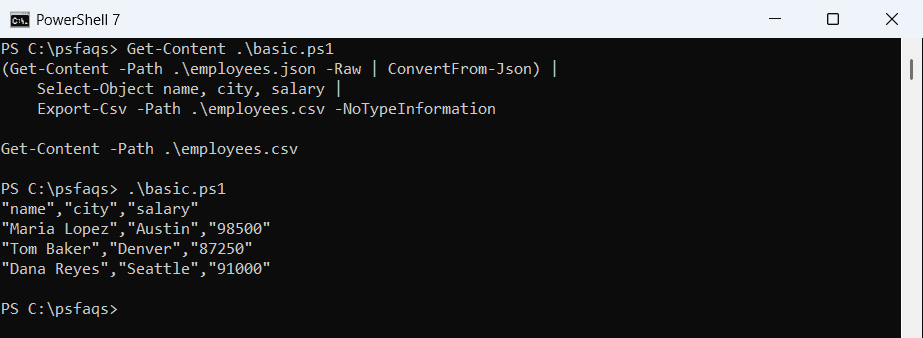
Select-Object picks and orders the columns. -NoTypeInformation is the default in PowerShell 7 but needed in 5.1, so keep it for scripts that run in both. Reading a JSON file into an array covers the first half in more detail.
Why does my CSV have only one empty row?
In Windows PowerShell 5.1, ConvertFrom-Json sends a JSON array down the pipeline as one object instead of one object per record. Here’s the same pipeline with and without parentheses:
$csv = Get-Content -Path .\employees.json -Raw | ConvertFrom-Json |
    Select-Object name, city | ConvertTo-Csv -NoTypeInformation
"Without parentheses: $($csv.Count - 1) data rows"

$csv = (Get-Content -Path .\employees.json -Raw | ConvertFrom-Json) |
    Select-Object name, city | ConvertTo-Csv -NoTypeInformation
"With parentheses:    $($csv.Count - 1) data rows"
Output:
Without parentheses: 3 data rows
With parentheses:    3 data rows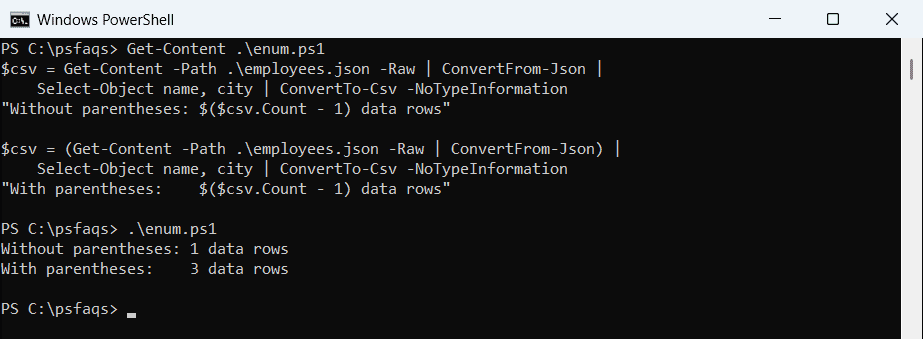
That’s the PowerShell 7 output, which gives three rows either way. In 5.1 the first version writes one row of empty values. Wrapping the command in parentheses, or saving it in a variable first, fixes it in both.
Why do dates change when converting JSON to CSV?
ConvertFrom-Json in PowerShell 7 turns ISO timestamps into DateTime objects, and Export-Csv then writes them in your date format:
$rows = Get-Content -Path .\employees.json -Raw | ConvertFrom-Json
"hired is a $($rows[0].hired.GetType().Name)"
$rows | Select-Object name, hired | ConvertTo-Csv -NoTypeInformation | Select-Object -First 2
Output:
hired is a DateTime
"name","hired"
"Maria Lopez","10/7/2026 1:15:00 PM"
That’s PowerShell 7, which shows 1:15 PM because the Z means UTC. Windows PowerShell 5.1 leaves the text alone and writes 2026-10-07T13:15:00Z. In PowerShell 7.5 and later, add -DateKind String to keep the original text:
(Get-Content -Path .\employees.json -Raw | ConvertFrom-Json -DateKind String) | Export-Csv -Path .\employees.csvFor other date layouts, formatting dates in PowerShell shows how to write them your way.
Convert nested JSON to CSV
CSV has no place for objects inside objects. Export-Csv calls ToString() on them, which gives unreadable values, so pull the inner values out with calculated properties:
$people = Get-Content -Path .\nested.json -Raw | ConvertFrom-Json

"As-is:"
$people | ConvertTo-Csv -NoTypeInformation
"Flattened:"
$people | Select-Object name,
    @{ n = 'city';   e = { $_.address.city } },
    @{ n = 'state';  e = { $_.address.state } },
    @{ n = 'skills'; e = { $_.skills -join ';' } } |
    ConvertTo-Csv -NoTypeInformation
Output:
As-is:
"name","address","skills"
"Maria Lopez","@{city=Austin; state=TX}","System.Object[]"
"Tom Baker","@{city=Denver; state=CO}","System.Object[]"
Flattened:
"name","city","state","skills"
"Maria Lopez","Austin","TX","PowerShell;Azure"
"Tom Baker","Denver","CO","SQL"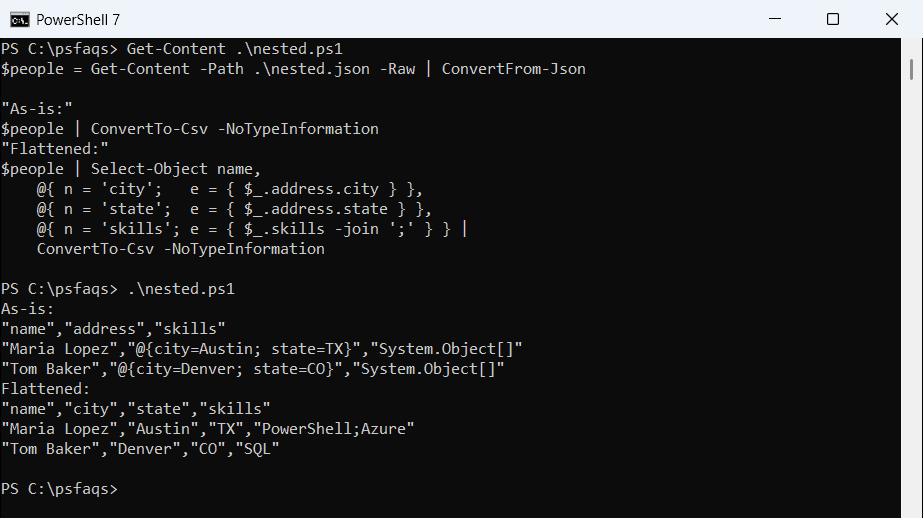
I joined the skills array with semicolons so it stays in one cell. Select-Object calculated properties work the same way for any nested data.
Keep every column when records have different fields
Export-Csv builds the columns from the first record only. Dana’s manager field is the last one, so it silently disappears unless you collect every property name first:
$rows = Get-Content -Path .\employees.json -Raw | ConvertFrom-Json

"Default (columns from the first record):"
($rows | ConvertTo-Csv -NoTypeInformation)[0]

$allColumns = $rows | ForEach-Object { $_.PSObject.Properties.Name } | Select-Object -Unique
"All columns:"
($rows | Select-Object $allColumns | ConvertTo-Csv -NoTypeInformation)[0]
Output:
Default (columns from the first record):
"name","city","salary","hired"
All columns:
"name","city","salary","hired","manager"
Select-Object -Unique keeps the order the names first appear. Records without a manager get an empty cell. The Export-Csv guide has more on how it picks columns.
Convert JSON with a top-level property
APIs often wrap the list in a property, like employees. Converting the top-level object gives one useless row, so point at the array instead:
$data = Get-Content -Path .\wrapped.json -Raw | ConvertFrom-Json

"Top level:"
$data | ConvertTo-Csv -NoTypeInformation
"The employees array:"
$data.employees | ConvertTo-Csv -NoTypeInformation
Output:
Top level:
"company","employees"
"Contoso","System.Object[]"
The employees array:
"name","city"
"Maria Lopez","Austin"
"Tom Baker","Denver"
If you’re pulling JSON from a web API, getting JSON data from a URL shows how to fetch it first.