
To find the WWN number in Windows with PowerShell, run Get-InitiatorPort and filter for Fibre Channel ports. NodeAddress is the WWNN and PortAddress is the WWPN:
Get-InitiatorPort -ConnectionType FibreChannel | Select-Object -Property InstanceName, NodeAddress, PortAddressStorage admins ask for the WWPN when they zone a switch or map LUNs to a server. Below I format the numbers the way SAN tools expect them, query remote servers, and explain what you see on a PC without a Fibre Channel card.
Run it as administrator
Get-InitiatorPort reads storage information that needs admin rights. From a normal window it fails, as it did on my test laptop:
try { Get-InitiatorPort -ErrorAction Stop }
catch { "Failed. $($_.Exception.Message)" }
Output:
Failed. Access to a CIM resource was not available to the client.Windows PowerShell 5.1 shows the same error, so open PowerShell with Run as administrator. Get-InitiatorPort also lists iSCSI and SAS ports when they exist. iSCSI uses an IQN name instead of a WWN. If you need another account, see running PowerShell as a different user.
WWNs belong to host bus adapters (HBAs), which servers have and laptops usually don’t. The low-level WMI class for Fibre Channel adapters shows that on my laptop:
try {
    Get-CimInstance -Namespace root\WMI -ClassName MSFC_FCAdapterHBAAttributes -ErrorAction Stop
}
catch { "Failed. $($_.Exception.Message)" }
Output:
Failed. The requested operation is not supported.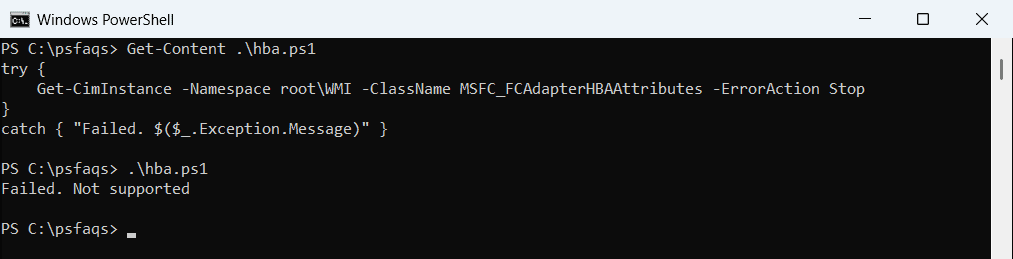
PowerShell 7 words it as The requested operation is not supported. On a server with an HBA driver, this class returns the adapter details instead.
Format the WWN with colons
Get-InitiatorPort returns WWNs as 16 hex digits with no separators. Switches and SAN arrays usually show them in pairs separated by colons. This small function converts either style:
function Format-Wwn ([string]$Raw) {
    $hex = $Raw -replace '[^0-9A-Fa-f]', ''
    (($hex.ToLower() -split '(..)') | Where-Object { $_ }) -join ':'
}

Format-Wwn '20000025B500A01F'
Format-Wwn '21-00-00-24-FF-4C-8A-12'

$bytes = [byte[]](0x50, 0x01, 0x43, 0x80, 0x12, 0x34, 0x56, 0x78)
($bytes | ForEach-Object { '{0:x2}' -f $_ }) -join ':'
Output:
20:00:00:25:b5:00:a0:1f
21:00:00:24:ff:4c:8a:12
50:01:43:80:12:34:56:78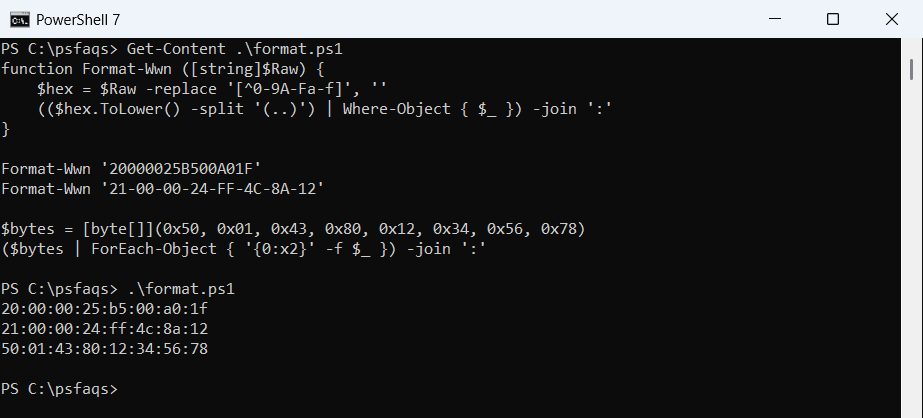
The last line converts a byte array, which is how some WMI classes return the WWN. For text stored as bytes, see converting a byte array to a string.
Get the WWNN and WWPN for each port
On a server with a dual-port card, filter for Fibre Channel and format both addresses. I used sample objects with the real property names, since my laptop has no HBA:
function Format-Wwn ([string]$Raw) {
    $hex = $Raw -replace '[^0-9A-Fa-f]', ''
    (($hex.ToLower() -split '(..)') | Where-Object { $_ }) -join ':'
}

$ports = @(
    [pscustomobject]@{ InstanceName = 'PCI\VEN_1077&DEV_2031\0'; NodeAddress = '20000024FF4C8A12'; PortAddress = '21000024FF4C8A12'; ConnectionType = 'FibreChannel' }
    [pscustomobject]@{ InstanceName = 'PCI\VEN_1077&DEV_2031\1'; NodeAddress = '20000024FF4C8A13'; PortAddress = '21000024FF4C8A13'; ConnectionType = 'FibreChannel' }
    [pscustomobject]@{ InstanceName = 'ROOT\ISCSIPRT\0000_0';    NodeAddress = 'iqn.1991-05.com.microsoft:nyc-sql-01'; PortAddress = 'ISCSI ANY PORT'; ConnectionType = 'iSCSI' }
)
$ports | Where-Object ConnectionType -EQ 'FibreChannel' |
    Select-Object -Property @{ Name = 'WWNN'; Expression = { Format-Wwn $_.NodeAddress } },
                            @{ Name = 'WWPN'; Expression = { Format-Wwn $_.PortAddress } }
Output:
WWNN                    WWPN
----                    ----
20:00:00:24:ff:4c:8a:12 21:00:00:24:ff:4c:8a:12
20:00:00:24:ff:4c:8a:13 21:00:00:24:ff:4c:8a:13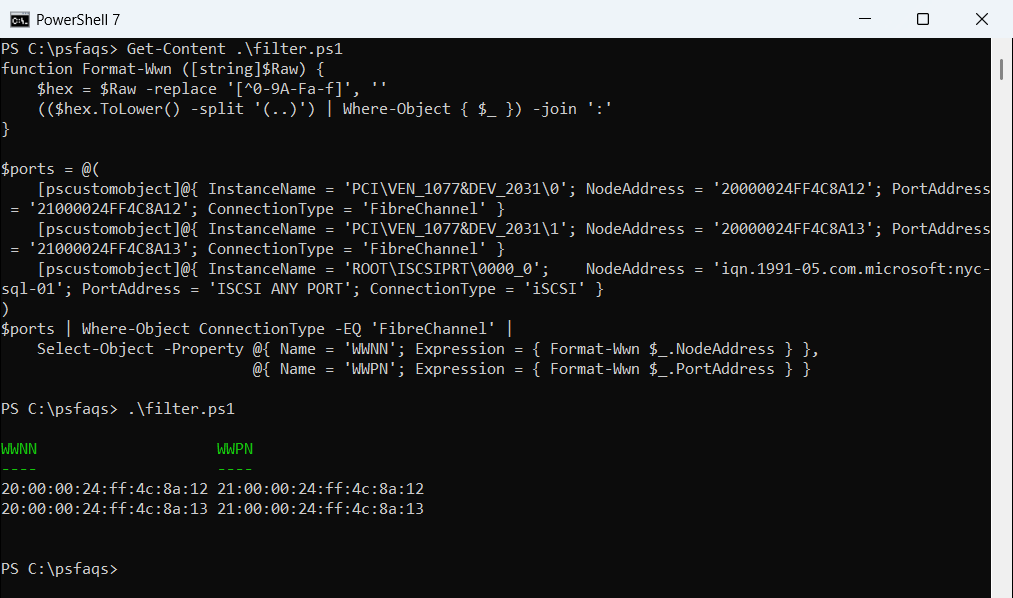
The iSCSI port is filtered out. On a real server, replace $ports with Get-InitiatorPort. The filter is a standard Where-Object call.
Get WWNs from remote servers
Get-InitiatorPort accepts -CimSession, so you can collect WWPNs from many servers at once:
$session = New-CimSession -ComputerName 'NYC-SQL-01', 'NYC-SQL-02'
Get-InitiatorPort -CimSession $session -ConnectionType FibreChannel |
    Select-Object -Property PSComputerName, InstanceName, PortAddress
Remove-CimSession -CimSession $session
Export the result to CSV and you have the zoning list for a new SAN in one go. See PowerShell Export-Csv.
Virtual Fibre Channel in Hyper-V
Virtual machines with virtual Fibre Channel adapters have their own WWPNs, two sets per adapter for live migration. Read them on the Hyper-V host:
Get-VMFibreChannelHba -VMName 'SQL-VM01' |
    Select-Object -Property SanName, WorldWidePortNameSetA, WorldWidePortNameSetB
Give the storage team both sets, or live migration fails on the destination host.
Frequently Asked Questions
How do I find the WWN in Windows with PowerShell?
Run Get-InitiatorPort -ConnectionType FibreChannel. NodeAddress is the WWNN and PortAddress is the WWPN. See the Get-InitiatorPort reference.
What is the difference between WWNN and WWPN?
The WWNN identifies the adapter, and the WWPN identifies each port on it. SAN zoning usually uses the WWPN.
Why does Get-InitiatorPort say access is denied?
It needs administrator rights. Run PowerShell as administrator. A PC without an HBA then simply has no Fibre Channel ports to list.
How do I format a WWN with colons in PowerShell?
Split the 16 hex digits into pairs and join them with colons, as the Format-Wwn function in this post does.