
Need a random number between 1 and 10? To generate random numbers in PowerShell, call Get-Random with a range, and remember the maximum is never returned:
Get-Random -Minimum 1 -Maximum 11That prints a whole number from 1 to 10. Below, I cover decimals, several numbers at once, seeds, 6-digit codes, .NET options and secure numbers, each tested in PowerShell 7.6 and Windows PowerShell 5.1.
What does Get-Random return with no parameters?
On its own, Get-Random returns a non-negative 32-bit integer between 0 and [int32]::MaxValue (2,147,483,647):
$n = Get-Random
$n
$n.GetType().Name
Output:
1469641061
Int32
Your number will differ, since every run is random. The type is Int32, so you can do math with it right away, with no string-to-int conversion.
Random number between 1 and 10: why -Maximum is exclusive
-Minimum is inclusive and -Maximum is exclusive. To prove it, I drew 20,000 numbers with each upper limit and checked the lowest and highest values:
$max10 = 1..20000 | ForEach-Object { Get-Random -Minimum 1 -Maximum 10 }
$max11 = 1..20000 | ForEach-Object { Get-Random -Minimum 1 -Maximum 11 }
$a = $max10 | Measure-Object -Minimum -Maximum
$b = $max11 | Measure-Object -Minimum -Maximum
"-Maximum 10 -> lowest $($a.Minimum), highest $($a.Maximum)"
"-Maximum 11 -> lowest $($b.Minimum), highest $($b.Maximum)"
Output:
-Maximum 10 -> lowest 1, highest 9
-Maximum 11 -> lowest 1, highest 10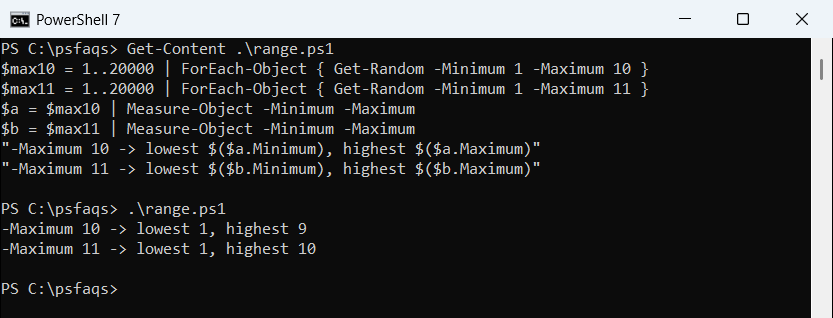
So for 1 to 10, pass -Maximum 11. Measure-Object’s -Minimum and -Maximum switches are a quick way to test any range like this.
Generate a random decimal (double) number
If either limit is a decimal, Get-Random returns a Double instead of an integer. Round it for money-style values:
$d = Get-Random -Minimum 0.0 -Maximum 1.0
$d.GetType().Name
$price = [math]::Round((Get-Random -Minimum 10.0 -Maximum 100.0), 2)
"Price: `$$price"
Output:
Double
Price: $76.65
Writing 0.0 instead of 0 is enough to switch the type. For more on trimming decimals, see rounding to 2 decimal places.
Get several random numbers at once with -Count
PowerShell 7 lets you combine -Count with a number range. Windows PowerShell 5.1 doesn’t, so the loop below is the portable way:
try {
    $nums = Get-Random -Count 5 -Minimum 1 -Maximum 50 -ErrorAction Stop
    "Get-Random -Count: $($nums -join ', ')"
} catch {
    "Failed. $($_.Exception.Message)"
}
$nums = 1..5 | ForEach-Object { Get-Random -Minimum 1 -Maximum 50 }
"Loop: $($nums -join ', ')"
Output:
Get-Random -Count: 44, 5, 10, 49, 4
Loop: 2, 18, 7, 30, 40
In 5.1, the first call stops with “Parameter set cannot be resolved using the specified named parameters.”. The loop works in both versions and is explained in my ForEach loop guide.
Both forms can repeat a number, because each draw is independent.
How do I generate unique random numbers?
Pass the full list of allowed values with -InputObject. With a collection, -Count returns each item only once, like a lottery draw:
$picks = Get-Random -InputObject (1..49) -Count 6 | Sort-Object
$picks -join ', '
"Unique: $(($picks | Select-Object -Unique).Count -eq 6)"
Output:
2, 6, 9, 10, 19, 31
Unique: True
This works the same in both shells. The same idea picks names or files; picking random items from an array goes deeper.
Repeat the same random numbers with -SetSeed
-SetSeed makes the sequence repeatable, which helps when you debug a script or write tests. The seed applies to every later Get-Random call in the session:
$first = @(Get-Random -Maximum 100 -SetSeed 2026)
$first += 1..2 | ForEach-Object { Get-Random -Maximum 100 }
"Run 1: $($first -join ', ')"
$second = @(Get-Random -Maximum 100 -SetSeed 2026)
$second += 1..2 | ForEach-Object { Get-Random -Maximum 100 }
"Run 2: $($second -join ', ')"
"PowerShell $($PSVersionTable.PSVersion.Major)"
Output:
Run 1: 97, 73, 77
Run 2: 97, 73, 77
PowerShell 7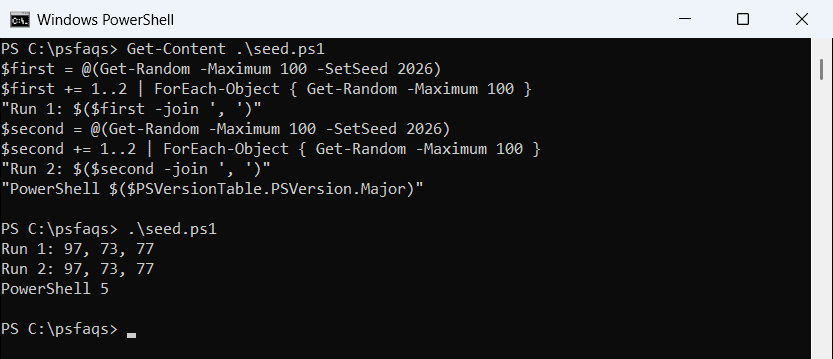
I expected the two versions to disagree, but seed 2026 produced 97, 73, 77 in PowerShell 7.6 and 5.1 alike. Microsoft doesn’t promise that, so don’t depend on it across versions.
Seeded numbers aren’t random at all, so never seed anything security-related.
Shuffle numbers with -Shuffle (PowerShell 7.1+)
-Shuffle returns the whole collection in random order. It arrived in PowerShell 7.1, so this example falls back to -Count in older versions:
$list = 'Austin', 'Denver', 'Seattle', 'Boston', 'Miami'
try {
    ($list | Get-Random -Shuffle -ErrorAction Stop) -join ', '
} catch {
    "Failed. $($_.Exception.Message)"
    (Get-Random -InputObject $list -Count $list.Count) -join ', '
}
Output: