
To read a JSON file into an array in PowerShell, read the whole file as one string with Get-Content -Raw and pipe it to ConvertFrom-Json. A JSON array becomes a PowerShell array of objects:
$staff = Get-Content -Path .\staff.json -Raw | ConvertFrom-Json
$staff[0].Name    # Maria Lopez
That one line covers most files. The rest of this guide handles the cases that break it: one-item arrays, nested arrays, Windows PowerShell 5.1 quirks and saving changes back. I ran every example in PowerShell 7.6 and Windows PowerShell 5.1.
Read a JSON file into an array with ConvertFrom-Json
Here’s the sample file I’ll use, staff.json. It’s a JSON array (square brackets) of three objects, and each object has its own Skills array:
[
  { "Name": "Maria Lopez", "City": "Austin",  "Skills": ["SQL", "Azure"] },
  { "Name": "Tom Baker",   "City": "Denver",  "Skills": ["PowerShell"] },
  { "Name": "Dana Reyes",  "City": "Seattle", "Skills": [] }
]
Read it, check what you got, and loop through the items:
$staff = Get-Content -Path .\staff.json -Raw | ConvertFrom-Json
"Type:  $($staff.GetType().FullName)"
"Count: $($staff.Count)"
"First: $($staff[0].Name)"
foreach ($person in $staff) {
    "{0,-12} {1,-8} {2}" -f $person.Name, $person.City, ($person.Skills -join ', ')
}
Output:
Type:  System.Object[]
Count: 3
First: Maria Lopez
Maria Lopez  Austin   SQL, Azure
Tom Baker    Denver   PowerShell
Dana Reyes   Seattle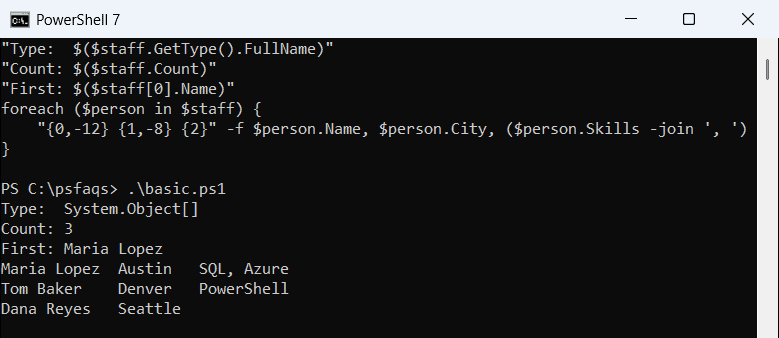
Each item is a PSCustomObject, so you read values with dot notation like $person.City. The foreach loop in PowerShell walks the array, and indexes start at zero.
Both shells printed the same output here. To grab a single item, see how to get the first element of an array.
Why use Get-Content -Raw for JSON files?
Without -Raw, Get-Content returns one string per line. With it, you get the whole file as a single string, which is exactly what a JSON parser expects:
$lines = Get-Content -Path .\staff.json
$text  = Get-Content -Path .\staff.json -Raw
"Without -Raw: $($lines.Count) strings"
"With -Raw:    $($text.Count) string"
"Parsed:       $(($text | ConvertFrom-Json).Count) objects"
Output:
Without -Raw: 5 strings
With -Raw:    1 string
Parsed:       3 objects
My five-line file came back as five strings without -Raw. That’s handy for log files, which is covered in reading a file line by line, but not for JSON.
Both shells still parsed my file without -Raw, because ConvertFrom-Json collects the lines first. I’d keep -Raw anyway; it’s the documented pattern and sends one string instead of hundreds.
Why does a JSON array with one item not act like an array?
When the file holds a one-item array, PowerShell 7 unrolls it and hands you the single object. Then $one.Count and $one[0] work only by luck. Saving the result to a variable and wrapping that variable in @() forces an array:
$one = Get-Content -Path .\one.json -Raw | ConvertFrom-Json
"Without @(): $($one.GetType().Name)"
$one = @($one)
"With @():    $($one.GetType().Name), Count $($one.Count)"
Output:
Without @(): PSCustomObject
With @():    Object[], Count 1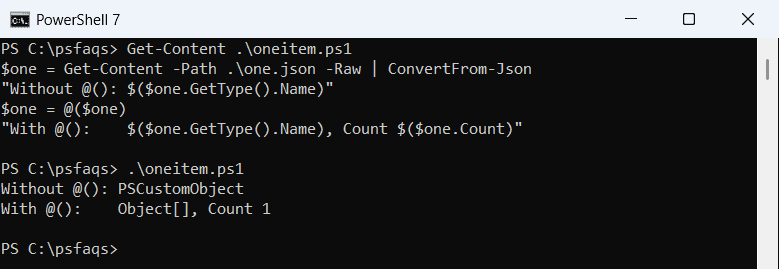
Windows PowerShell 5.1 behaves differently here. It printed Object[] for both lines, because it doesn’t unroll the array at all:
Without @(): Object[]
With @():    Object[], Count 1
PowerShell 7 also has -NoEnumerate, which keeps the array intact so it survives a round trip back to JSON:
try {
    $one = Get-Content -Path .\one.json -Raw | ConvertFrom-Json -NoEnumerate
    "Type: $($one.GetType().Name)"
    "Back to JSON: $(ConvertTo-Json -InputObject $one -Compress)"
} catch {
    "Failed. $($_.Exception.Message)"
}
Output:
Type: Object[]
Back to JSON: [{"Name":"Maria Lopez","City":"Austin"}]
In 5.1 the same script printed Failed. A parameter cannot be found that matches parameter name 'NoEnumerate'., so use @() when a script must run in both. If the file might be empty, also check whether the array is empty before you use it.
Windows PowerShell 5.1 sends the whole array as one object
This one catches a lot of scripts. In 5.1, ConvertFrom-Json writes the entire array to the pipeline as a single object, so the next command sees one item instead of three:
$n = 0
Get-Content -Path .\staff.json -Raw | ConvertFrom-Json |
    ForEach-Object { $n++ }
"Items seen by ForEach-Object: $n"
$wrapped = @(Get-Content -Path .\staff.json -Raw | ConvertFrom-Json)
"Count after @():              $($wrapped.Count)"
$n = 0
(Get-Content -Path .\staff.json -Raw | ConvertFrom-Json) |
    ForEach-Object { $n++ }
"Items with parentheses:       $n"
Output:
Items seen by ForEach-Object: 3
Count after @():              3
Items with parentheses:       3