
To use continue in a PowerShell loop, put it inside an if test. When the test is true, PowerShell skips the rest of that pass and moves to the next item:
foreach ($n in 1..5) {
    if ($n -eq 3) { continue }
    $n
}
Output:
1
2
4
5
In this tutorial, I’ll show you how continue in a PowerShell loop works in foreach, for, while and do loops, plus the switch and ForEach-Object cases that surprise people.
The sample order list we’ll use
Every example reads this small CSV file of store orders:
$orders = Import-Csv .\continue-orders.csv
$orders | Format-Table -AutoSize
Output:
Id   Customer     City    Amount  Status   Items
--   --------     ----    ------  ------   -----
1001 Maria Lopez  Austin  250.00  Paid     Mug;Tee
1002 Tom Baker    Denver  75.00   Canceled Hoodie
1003 Dana Reyes   Seattle 1250.50 Paid     Jacket;Cap
1004 Chris Young  Boston          Pending  Cap
1005 Alex Kim     Chicago 89.99   Paid     Socks;Boots (backorder)
1006 Jordan Price Miami   410.00  Refunded Tee
Import-Csv turns each row into an object, so $order.Status works right away. See how to loop through a CSV file with Import-Csv if that’s new.
Method 1: Use continue in a foreach loop
Say you only want to bill paid orders. The other rows should be skipped without stopping the loop:
$orders = Import-Csv .\continue-orders.csv
$total = 0

foreach ($order in $orders) {
    if ($order.Status -ne 'Paid') {
        continue
    }
    $total += [decimal]$order.Amount
    "Billed order $($order.Id) for $($order.Customer)"
}
"Total billed: `$$total"
Output:
Billed order 1001 for Maria Lopez
Billed order 1003 for Dana Reyes
Billed order 1005 for Alex Kim
Total billed: $1590.49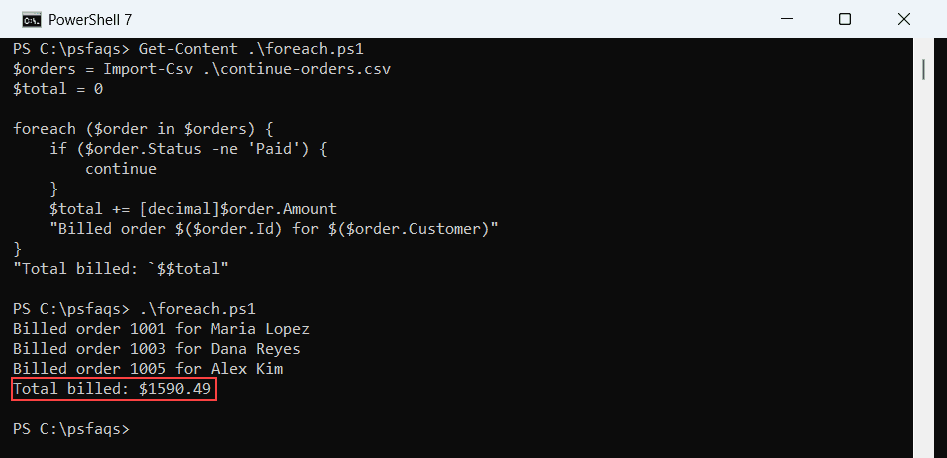
How does this code work? When the status isn’t Paid, continue jumps back to the top of the PowerShell foreach loop and picks up the next order. The total only grows for paid rows.
Pro Tip: test for the bad case first and continue. The main code stays unindented.
Method 2: Use continue in a for loop
In a for loop, continue still runs $i++ before the next condition check. Here it skips the row with no amount:
$orders = Import-Csv .\continue-orders.csv
for ($i = 0; $i -lt $orders.Count; $i++) {
    $order = $orders[$i]
    if ([string]::IsNullOrWhiteSpace($order.Amount)) {
        "Row $($i + 1) skipped: no amount"
        continue
    }
    "Row $($i + 1): `$$($order.Amount)"
}
Output:
Row 1: $250.00
Row 2: $75.00
Row 3: $1250.50
Row 4 skipped: no amount
Row 5: $89.99
Row 6: $410.00
How does this code work? IsNullOrWhiteSpace catches the blank Amount on row 4, and continue moves on.
Since $i++ lives in the header, continue can’t cause an endless loop. More patterns are in the PowerShell for loop guide.
Method 3: Use continue in while and do loops
While and do loops have no repeat section, so change the counter before continue. This loop flags orders of $100 or more:
$orders = Import-Csv .\continue-orders.csv
$i = 0
while ($i -lt $orders.Count) {
    $order = $orders[$i]
    $i++
    if ([decimal]$order.Amount -lt 100) { continue }
    "Order $($order.Id) needs a signature (`$$($order.Amount))"
}
Output:
Order 1001 needs a signature ($250.00)
Order 1003 needs a signature ($1250.50)
Order 1006 needs a signature ($410.00)
How does this code w