
A settings file once told my script SendEmail = False, and the email went out anyway. A PowerShell Boolean is only $true or $false; the text ‘False’ is just a non-empty string:
$sendEmail = $false
if (-not $sendEmail) { 'Skipping the email' }
In this tutorial, I’ll show you how a PowerShell Boolean works: the [bool] type, which values count as true, -not and -and, [switch] parameters and the gotchas that bit me.
Quick answer for the values people ask about most:
| Value | In an if statement |
|---|---|
'', 0, $null, @() | False |
'False', '0', any other text | True |
@(0) (one item) | False, the item’s own value |
What are $true and $false in PowerShell?
They’re automatic variables holding the two values of System.Boolean, which PowerShell calls [bool]. You use them like any value when you set a variable in PowerShell:
$isActive = $true
$isActive
$isActive.GetType().FullName
try { $true = 1 } catch { "Failed. $($_.Exception.Message)" }
Output:
True
System.Boolean
Failed. Cannot overwrite variable true because it is read-only or constant.
Both are constants, so $true = 1 fails.
Most Booleans come from a test, though. Any of the PowerShell comparison operators returns one when a single value sits on the left:
$total = 1250
$isLarge = $total -gt 1000
$isLarge
$isLarge -is [bool]
Output:
True
True
Which values are true or false in PowerShell?
PowerShell converts any value to a Boolean inside an if condition or a [bool] cast:
$values = [ordered]@{
    "''"      = ''
    "'0'"     = '0'
    "'False'" = 'False'
    '0'       = 0
    '$null'   = $null
    '@()'     = @()
    '@(0)'    = @(0)
    '@(0, 0)' = @(0, 0)
    '@{}'     = @{}
}
foreach ($key in $values.Keys) {
    '{0,-8} -> {1}' -f $key, [bool]$values[$key]
}
Output:
''       -> False
'0'      -> True
'False'  -> True
0        -> False
$null    -> False
@()      -> False
@(0)     -> False
@(0, 0)  -> True
@{}      -> True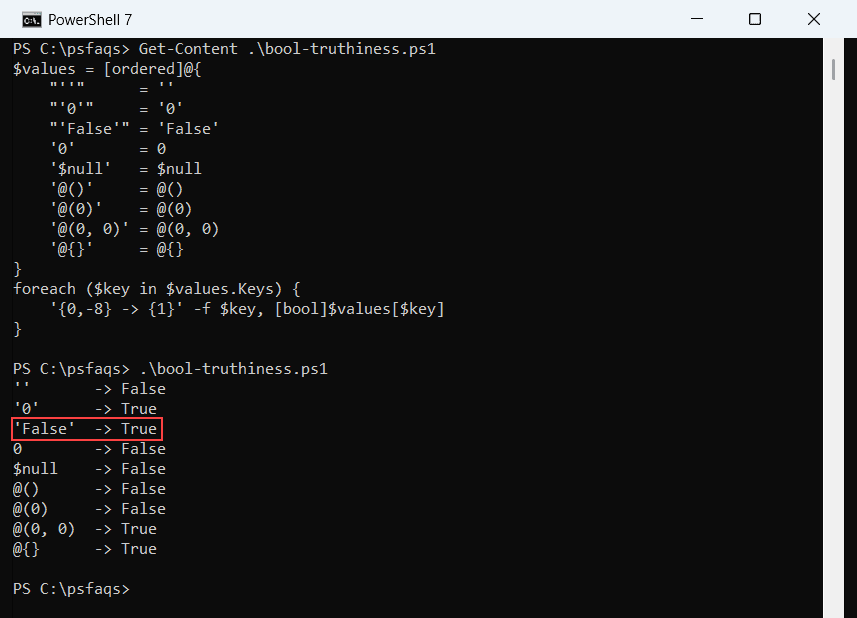
Empty strings, 0, $null and empty arrays are false; every non-empty string is true. One array element takes that element’s value, and two or more are always true. An empty hashtable counts as one object, so it’s true.
That’s why if ($orders) can check whether an array is empty. For strings, [string]::IsNullOrEmpty() reads more clearly.
Why does [bool]’False’ return True?
The cast only asks whether the string is empty. Comparisons add a twist, because PowerShell converts the right side to the type of the left side:
"[bool]'False'           : $([bool]'False')"
"`$true -eq 'False'       : $($true -eq 'False')"
"'False' -eq `$true       : $('False' -eq $true)"
"2 -eq `$true             : $(2 -eq $true)"
"[bool]::Parse('False')  : $([bool]::Parse('False'))"
Output:
[bool]'False'           : True
$true -eq 'False'       : True
'False' -eq $true       : False
2 -eq $true             : False
[bool]::Parse('False')  : False