
To expand an array in PowerShell, pipe the objects to Select-Object -ExpandProperty and name the property that holds the array. You get every value as its own item instead of a {a, b} blob:
$teams | Select-Object -ExpandProperty MembersBelow I cover dot notation, keeping the parent value, the {a, b, c...} display limit, flattening nested arrays and growing an array. Each example ran in PowerShell 7 and Windows PowerShell 5.1.
Expand an array property with Select-Object -ExpandProperty
Here’s the sample data I’ll use throughout. Each team object has a Members property that holds an array of names, which is the shape you get from many cmdlets and from JSON.
The first command selects the property the normal way, and the second one expands it:
$teams = @(
    [pscustomobject]@{ Team = 'Sales'; City = 'Austin'; Members = @('Maria Lopez', 'Tom Baker') }
    [pscustomobject]@{ Team = 'Support'; City = 'Denver'; Members = @('Dana Reyes', 'Sam Carter', 'Lee Park') }
)

$teams | Select-Object -Property Members
$names = $teams | Select-Object -ExpandProperty Members
$names
"Items: $($names.Count), first item type: $($names[0].GetType().Name)"
Output:
Members
-------
{Maria Lopez, Tom Baker}
{Dana Reyes, Sam Carter, Lee Park}
Maria Lopez
Tom Baker
Dana Reyes
Sam Carter
Lee Park
Items: 5, first item type: String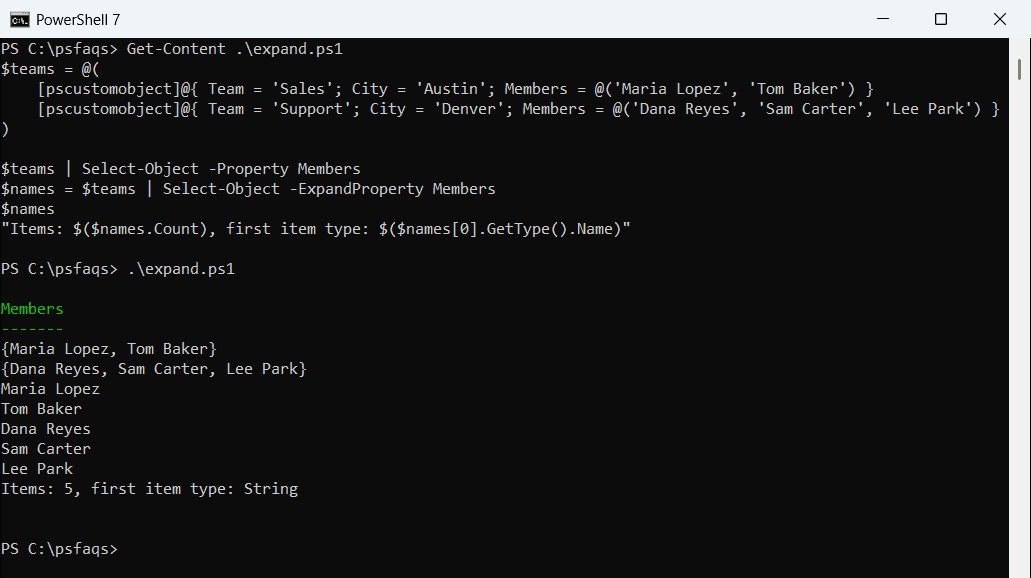
With -Property, you get new objects that still wrap the array, so each row shows the names in braces. With -ExpandProperty, you get five plain strings you can sort, filter or pass to another command.
That’s the main difference covered in the PowerShell Select-Object guide: one returns objects, the other returns the values themselves.
Expand array values with dot notation or ForEach-Object
Since PowerShell 3.0, you can also read a property straight off the whole collection. This is called member-access enumeration: PowerShell visits each item and returns its property value.
I compared four ways to pull out every member:
$teams = @(
    [pscustomobject]@{ Team = 'Sales'; City = 'Austin'; Members = @('Maria Lopez', 'Tom Baker') }
    [pscustomobject]@{ Team = 'Support'; City = 'Denver'; Members = @('Dana Reyes', 'Sam Carter', 'Lee Park') }
)

$all = $teams.Members
"Dot notation:        $($all.Count) items"
$fe = $teams | ForEach-Object -MemberName Members
"ForEach-Object:      $($fe.Count) items"
$m1 = $teams.ForEach('Members')
"ForEach('Members'):  $($m1.Count) items"
$m2 = $teams.ForEach({ $_.Members })
"ForEach({ ... }):    $($m2.Count) items"
Output:
Dot notation:        5 items
ForEach-Object:      5 items
ForEach('Members'):  2 items
ForEach({ ... }):    5 items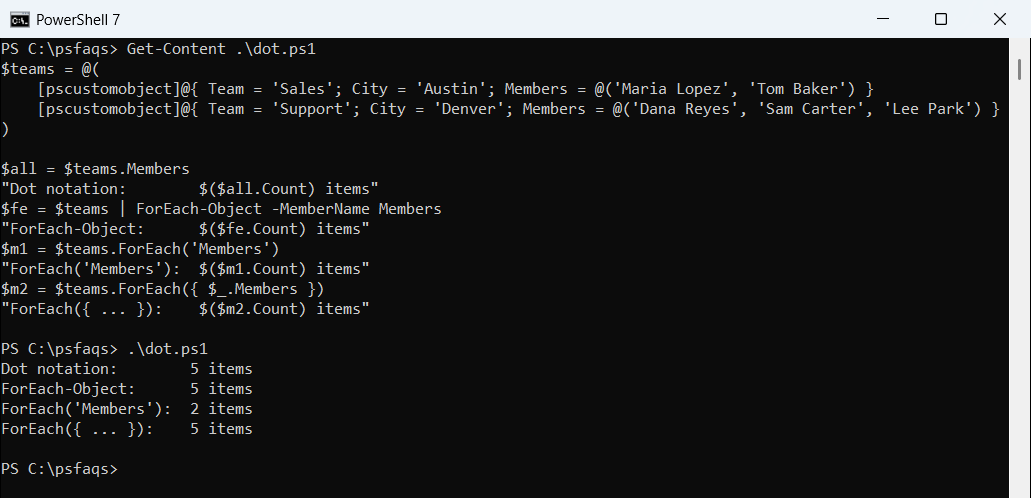
$teams.Members and ForEach-Object -MemberName returned all five names. The catch is the .ForEach('Members') method, which returned two items because it keeps each team’s array intact.
Use the script block form, .ForEach({ $_.Members }), when you want a flat result. The ForEach-Object cmdlet in PowerShell also explains the -MemberName shortcut.
How do I keep the parent property when I expand an array?
Expanding usually throws away the team name, which you often need for a report. Add -Property next to -ExpandProperty, and PowerShell attaches that value to every expanded item:
$teams = @(
    [pscustomobject]@{ Team = 'Sales'; City = 'Austin'; Members = @('Maria Lopez', 'Tom Baker') }
    [pscustomobject]@{ Team = 'Support'; City = 'Denver'; Members = @('Dana Reyes', 'Sam Carter', 'Lee Park') }
)

$teams |
    Select-Object -Property Team -ExpandProperty Members |
    ForEach-Object { "$($_.Team): $_" }
Output:
Sales: Maria Lopez
Sales: Tom Baker
Support: Dana Reyes
Support: Sam Carter
Support: Lee Park
Each name is still a string, but it now carries a hidden Team note property. It won’t show when you print the string, so read it with $_.Team as shown.
For a proper table, I prefer building one row per member with nested foreach loops. It’s easier to read and export:
$teams = @(
    [pscustomobject]@{ Team = 'Sales'; City = 'Austin'; Members = @('Maria Lopez', 'Tom Baker') }
    [pscustomobject]@{ Team = 'Support'; City = 'Denver'; Members = @('Dana Reyes', 'Sam Carter', 'Lee Park') }
)

$rows = foreach ($t in $teams) {
    foreach ($m in $t.Members) {
        [pscustomobject]@{ Team = $t.Team; City = $t.City; Member = $m }
    }
}
$rows | Format-Table
Output:
Team    City   Member
----    ----   ------
Sales   Austin Maria Lopez
Sales   Austin Tom Baker
Support Denver Dana Reyes
Support Denver Sam Carter
Support Denver Lee Park
This gives you real objects with Team, City and Member columns. If you’re new to that pattern, see how to create an array of objects in PowerShell.
Expand a nested object property
-ExpandProperty also works when the property holds a single object rather than an array. In that case, PowerShell outputs the inner object, so its own properties become the columns.
There’s a side effect that Microsoft documents and I confirmed: combining it with -Property adds that property to the original inner object:
$office = [pscustomobject]@{
    City    = 'Seattle'
    Manager = [pscustomobject]@{ Name = 'Maria Lopez'; Phone = '555-0100' }
}
$office | Select-Object -ExpandProperty Manager
$office | Select-Object -Property City -ExpandProperty Manager | Out-Null
"Manager now has: $($office.Manager.PSObject.Properties.Name -join ', ')"