
To convert YAML to JSON in PowerShell, install the powershell-yaml module, read the file with ConvertFrom-Yaml and pass the result to ConvertTo-Json with a higher -Depth:
Install-Module -Name powershell-yaml -Scope CurrentUser
Get-Content -Path .\deployment.yaml -Raw | ConvertFrom-Yaml -Ordered | ConvertTo-Json -Depth 10
PowerShell has ConvertTo-Json built in, but it has no YAML parser, so you need the module for real YAML files. Below I cover the module, a no-install option for simple files, and the -Depth trap that silently breaks nested JSON.
Check whether you have a YAML module
Neither PowerShell 7 nor Windows PowerShell 5.1 ships with ConvertFrom-Yaml. This is what my test PC returns:
$module = Get-Module -ListAvailable -Name powershell-yaml
"powershell-yaml installed: $([bool]$module)"
"ConvertFrom-Yaml available: $([bool](Get-Command -Name ConvertFrom-Yaml -ErrorAction SilentlyContinue))"
Output:
powershell-yaml installed: False
ConvertFrom-Yaml available: False
If you see True, skip the install step. The output was the same in both versions. To see every module you have, list the installed modules.
Convert YAML to JSON with powershell-yaml
powershell-yaml is the most widely used YAML module on the PowerShell Gallery. It’s published by Cloudbase and works in PowerShell 5.0 and later. Install it for your own account, so you don’t need admin rights:
Install-Module -Name powershell-yaml -Scope CurrentUserIn PowerShell 7.4 and later you can use the newer Install-PSResource instead. If Install-Module fails, see Install-Module is not recognized. Then convert a file in one line:
Get-Content -Path .\deployment.yaml -Raw |
    ConvertFrom-Yaml -Ordered |
    ConvertTo-Json -Depth 10 |
    Set-Content -Path .\deployment.json
Three details matter here. -Raw passes the file as one string, which is what a YAML parser expects. -Ordered keeps the keys in the same order as the YAML file, because a plain hashtable shuffles them. -Depth 10 stops nested sections from being cut off.
Files with several YAML documents
Kubernetes manifests often hold several documents separated by —. Add -AllDocuments to get an array with one item per document:
$docs = Get-Content -Path .\app-manifests.yaml -Raw | ConvertFrom-Yaml -AllDocuments
$docs | ConvertTo-Json -Depth 10
Let the module write the JSON
The module can also produce JSON itself, which avoids the depth limit entirely:
Get-Content -Path .\deployment.yaml -Raw | ConvertFrom-Yaml | ConvertTo-Yaml -JsonCompatibleThis returns compact JSON. Pipe it to ConvertFrom-Json and back to ConvertTo-Json if you want it indented.
Convert simple YAML without a module
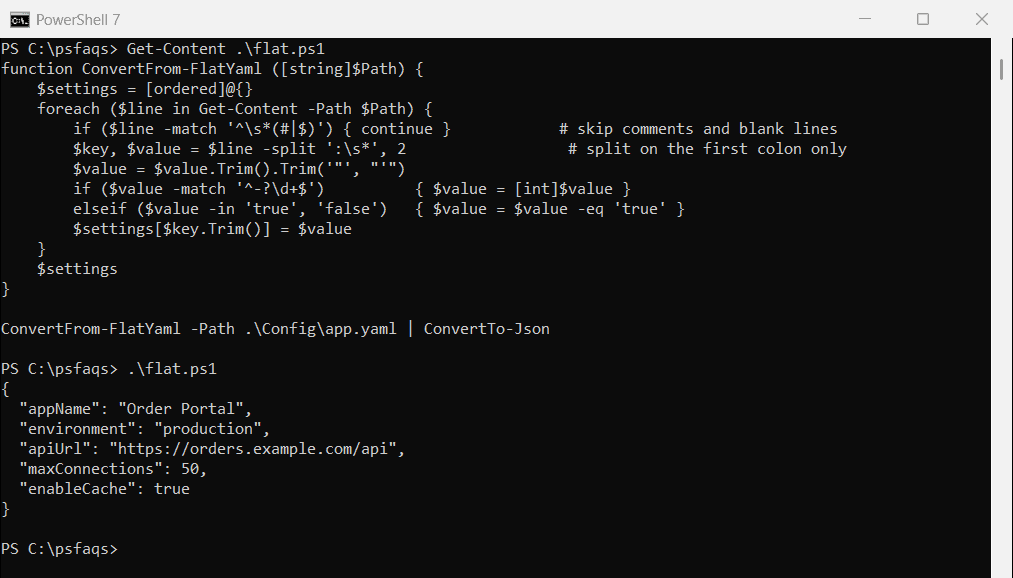
Some config files are just flat key: value lines. On servers where you can’t install modules, a short function handles them. My sample app.yaml has a comment, a quoted value and a URL with colons in it:
# Order portal settings, Austin data center
appName: "Order Portal"
environment: production
apiUrl: https://orders.example.com/api
maxConnections: 50
enableCache: true
The function skips comments and splits each line on the first colon only, so the URL stays whole. Numbers and true or false come out as real JSON types:
function ConvertFrom-FlatYaml ([string]$Path) {
    $settings = [ordered]@{}
    foreach ($line in Get-Content -Path $Path) {
        if ($line -match '^\s*(#|$)') { continue }            # skip comments and blank lines
        $key, $value = $line -split ':\s*', 2                  # split on the first colon only
        $value = $value.Trim().Trim('"', "'")
        if ($value -match '^-?\d+$')          { $value = [int]$value }
        elseif ($value -in 'true', 'false')   { $value = $value -eq 'true' }
        $settings[$key.Trim()] = $value
    }
    $settings
}

ConvertFrom-FlatYaml -Path .\Config\app.yaml | ConvertTo-Json
Output:
{
  "appName": "Order Portal",
  "environment": "production",
  "apiUrl": "https://orders.example.com/api",
  "maxConnections": 50,
  "enableCache": true
}
This doesn’t understand nested sections, lists, anchors or multi-line strings. For anything beyond flat settings, use the module. Similar parsing is covered in converting a string to a hashtable.
Why nested JSON comes out broken
ConvertTo-Json only goes 2 levels deep by default. YAML files are often nested much deeper, so the inner sections turn into type names.
This Kubernetes-style object is shaped like what ConvertFrom-Yaml returns for a deployment file. Converting it with the default depth cuts off everything below spec.template:
$deployment = [ordered]@{
    apiVersion = 'apps/v1'
    kind       = 'Deployment'
    metadata   = [ordered]@{ name = 'web-austin'; labels = [ordered]@{ app = 'web' } }
    spec       = [ordered]@{
        replicas = 3
        template = [ordered]@{
            spec = [ordered]@{
                containers = @([ordered]@{
                    name  = 'web'
                    image = 'nginx:1.27'
                    ports = @([ordered]@{ containerPort = 80 })
                })
            }
        }
    }
}

$deployment | ConvertTo-Json
Output:
WARNING: Resulting JSON is truncated as serialization has exceeded the set depth of 2.
{
  "apiVersion": "apps/v1",
  "kind": "Deployment",
  "metadata": {
    "name": "web-austin",
    "labels": {
      "app": "web"
    }
  },
  "spec": {
    "replicas": 3,
    "template": {
      "spec": "System.Collections.Specialized.OrderedDictionary"
    }
  }
}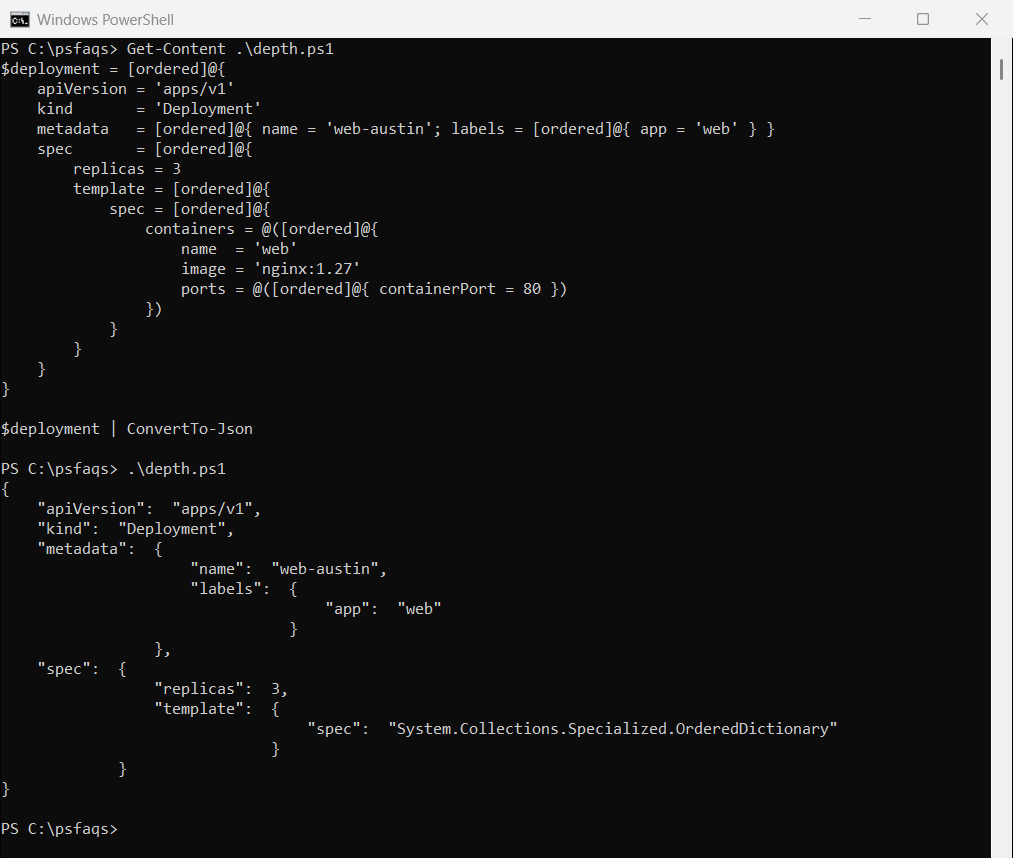
PowerShell 7 prints a warning that the JSON was truncated. Windows PowerShell 5.1 doesn’t warn at all, which is how broken config files reach production. The output above is from PowerShell 7, and the screenshot shows 5.1.
Fix it with -Depth
Set -Depth higher than your deepest level. I use 10 for most config files, and the maximum is 100. I saved the object above as deployment.ps1 and dot-source it here:
. .\deployment.ps1
$deployment | ConvertTo-Json -Depth 10
Output:
{
  "apiVersion": "apps/v1",
  "kind": "Deployment",
  "metadata": {
    "name": "web-austin",
    "labels": {
      "app": "web"
    }
  },
  "spec": {
    "replicas": 3,
    "template": {
      "spec": {
        "containers": [
          {
            "name": "web",
            "image": "nginx:1.27",
            "ports": [
              {
                "containerPort": 80
              }
            ]
          }
        ]
      }
    }
  }
}