Out-Host in PowerShell sends objects straight to the console window and returns nothing to the pipeline. You’ll reach for it to page long output or to make a table print right now instead of later:
$orders | Out-Host -PagingIn this tutorial, I’ll show you how Out-Host in PowerShell compares with Write-Host, Write-Output and Out-Default, how -Paging behaves, and how it fixes tables that print late or merge together.
What does Out-Host do in PowerShell?
Out-Host formats objects and hands them to the host, which is the program running PowerShell (usually the console). Nothing comes back, so a variable can’t catch it:
$a = 'Austin' | Out-Host
$b = Write-Host 'Denver'
$c = Write-Output 'Seattle'
$d = 'Boston' | Out-Default
"Out-Host empty: $($null -eq $a)"
"Write-Host empty: $($null -eq $b)"
"Write-Output: $c"
"Out-Default empty: $($null -eq $d)"
Output:
Austin
Denver
Boston
Out-Host empty: True
Write-Host empty: True
Write-Output: Seattle
Out-Default empty: True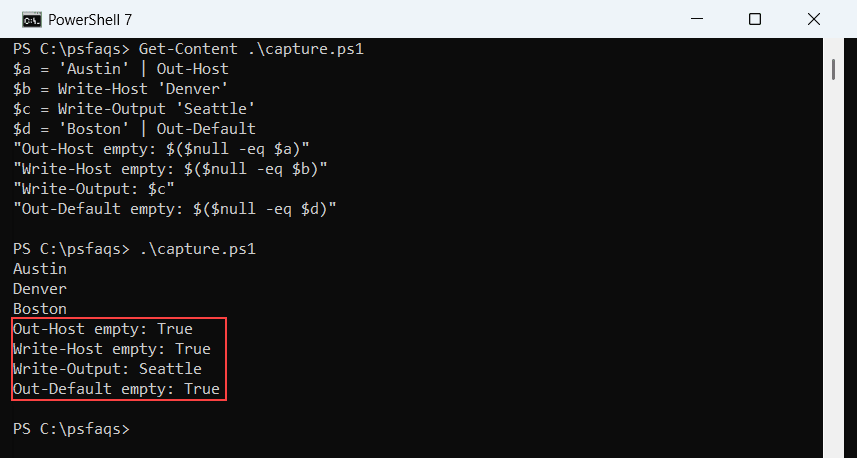
Three words printed, but only Write-Output kept its value, in 7 and 5.1. The Write-Host vs Write-Output comparison explains why that matters in scripts.
Out-Host vs Write-Host vs Write-Output vs Out-Default
All four can put text on screen, but they travel different routes:
| Command | Where output goes | Can you capture it? |
|---|---|---|
Write-Output | Success stream (the pipeline) | Yes, in a variable |
Write-Host | Information stream, then the host | Yes, with 6>&1 |
Out-Host | The host only | No |
Out-Default | Format system, then the console | No |
PowerShell adds Out-Default to every interactive pipeline for you. This test tried to capture the other two:
$info = Write-Host 'Write-Host line' 6>&1
"Captured from Write-Host: $($info.GetType().Name)"
$all = & { 'Out-Host line' | Out-Host } *>&1
"Captured from Out-Host: $(@($all).Count) objects"
Output:
Captured from Write-Host: InformationRecord
Out-Host line
Captured from Out-Host: 0 objects
Write-Host came back as an InformationRecord, but even *>&1 caught nothing from Out-Host. To hide it, don’t call it; to keep a copy, use Write-Output instead.
Write-Host also prints objects poorly, because it calls ToString(). A custom object piped to it came out as @{Customer=Dana Reyes; Total=2100}, while Out-Host printed a proper table. Keep Write-Host for colored messages.
Why does my table appear after Write-Host? Force it with Out-Host
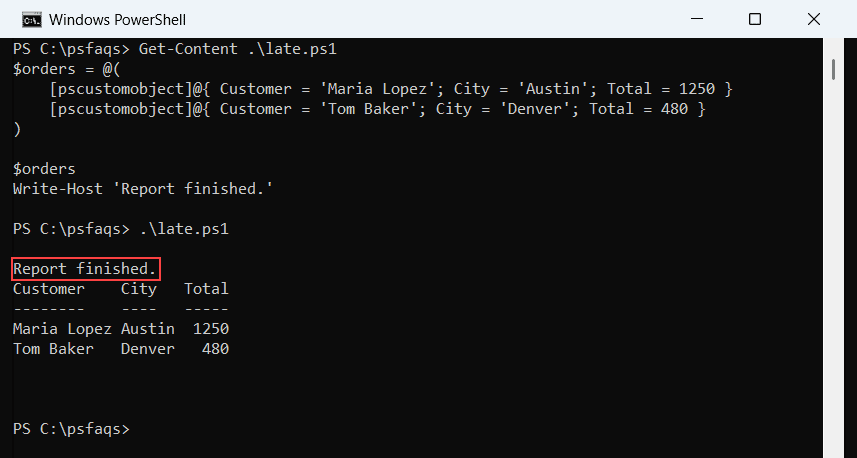
Here a script outputs a table, then writes a message:
$orders = @(
    [pscustomobject]@{ Customer = 'Maria Lopez'; City = 'Austin'; Total = 1250 }
    [pscustomobject]@{ Customer = 'Tom Baker'; City = 'Denver'; Total = 480 }
)

$orders
Write-Host 'Report finished.'
Output:
Report finished.
Customer    City   Total
--------    ----   -----
Maria Lopez Austin  1250
Tom Baker   Denver   480
The message printed first in both 7 and 5.1. The formatter held the table back for a moment, but Write-Host went to the screen at once.