
A PowerShell reference variable is a [ref] object that points to another variable. To pass by reference, type the parameter as [ref], call the function with ([ref]$var), and change .Value inside:
function Set-Discount { param([ref]$Price) $Price.Value = $Price.Value * 0.9 }
$price = 250
Set-Discount -Price ([ref]$price)   # $price is now 225
I’ll show how it works with functions, arrays, hashtables, and .NET methods like TryParse, plus the mistakes I see most and one PowerShell 7 vs 5.1 difference.
What is a reference variable in PowerShell?
[ref] is the type accelerator for System.Management.Automation.PSReference. When you cast a PowerShell variable with it, you get an object whose Value property reads and writes the original variable:
$total = 1200
$ref = [ref]$total
$ref.GetType().Name
$ref.Value += 300
"Total: $total"
Output:
PSReference`1
Total: 1500
Changing $ref.Value changed $total itself. Both shells report the type as PSReference`1, a generic wrapper around the variable’s type.
[ref] vs [System.Management.Automation.PSReference]
Microsoft Learn points out a subtle difference: casting with the full type name stores a copy, not a link to the variable. My runs matched that in both versions:
$int  = 1
$aRef = [ref]$int
$bRef = [System.Management.Automation.PSReference]$int
$aRef.Value += 2
$bRef.Value += 5
"int: $int  aRef: $($aRef.Value)  bRef: $($bRef.Value)"
Output:
int: 3 aRef: 3 bRef: 6$aRef changed $int, but $bRef only changed its own copy. Stick with [ref].
How to pass a variable by reference to a function
By default, PowerShell passes value types such as numbers and strings by value. The function gets a copy, so assigning a new value to the parameter doesn’t touch the caller’s variable.
A [ref] parameter changes that. Here’s the full function from the top of the post, run as a script:
function Set-Discount {
    param([ref]$Price)
    $Price.Value = $Price.Value * 0.9
}
$price = 250
Set-Discount -Price ([ref]$price)
"New price: $price"
Output:
New price: 225Three parts have to line up: the [ref] parameter type, the ([ref]$price) argument with both brackets and parentheses, and .Value inside the function. Leave out any one and it fails or does nothing.
This works the same way in any PowerShell function, whether it’s a simple function or an advanced one with [CmdletBinding()].
Return multiple values with [ref] parameters
A common reason to reach for [ref] is to hand back more than one result. Each output gets its own reference parameter:
function Get-SalesRange {
    param([int[]]$Sales, [ref]$Low, [ref]$High)
    $stats = $Sales | Measure-Object -Minimum -Maximum
    $Low.Value  = $stats.Minimum
    $High.Value = $stats.Maximum
}
$low = 0; $high = 0
Get-SalesRange -Sales 480, 1250, 730 -Low ([ref]$low) -High ([ref]$high)
"Austin store: low $low, high $high"
Output:
Austin store: low 480, high 1250It works, but it’s not the usual PowerShell style. Most of the time, it’s cleaner to return values from the function as a [pscustomobject] with Low and High properties.
I keep [ref] for cases that mirror .NET’s Try pattern: a True/False result plus an output value.
Do arrays and hashtables pass by reference in PowerShell?
Yes, sort of. Arrays, hashtables, and objects are reference types, so the function receives a reference to the same object. Changing what’s inside persists; replacing the whole object doesn’t:
function Set-FirstCity { param($List) $List[0] = 'Seattle' }
function Add-City      { param($List) $List += 'Denver' }
function Add-CityRef   { param([ref]$List) $List.Value += 'Denver' }
function Set-Owner     { param($Table) $Table.Owner = 'Maria Lopez' }

$cities = @('Austin', 'Boston')
Set-FirstCity $cities;      "Element change: $($cities -join ', ')"
Add-City $cities;           "Plain +=:       $($cities -join ', ')"
Add-CityRef ([ref]$cities); "[ref] +=:       $($cities -join ', ')"
$store = @{ City = 'Denver' }
Set-Owner $store;           "Hashtable:      $($store.Owner)"
Output:
Element change: Seattle, Boston
Plain +=:       Seattle, Boston
[ref] +=:       Seattle, Boston, Denver
Hashtable:      Maria Lopez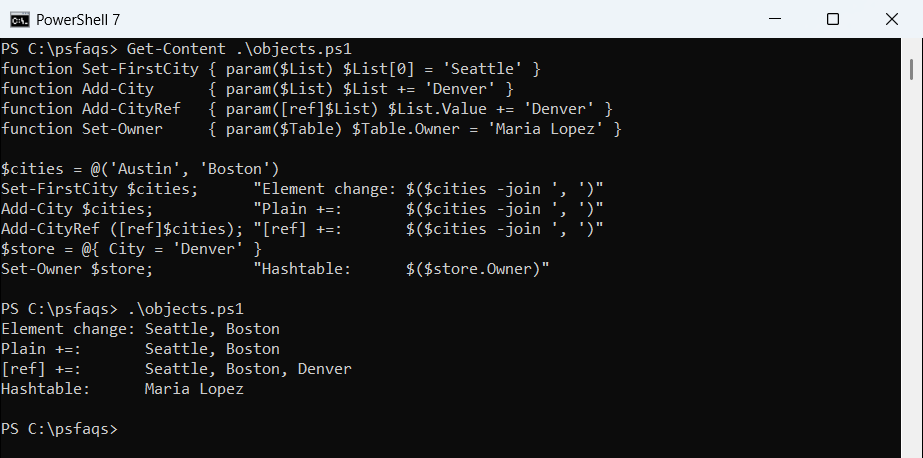
Setting $List[0] edited the shared array. But += creates a new array, because PowerShell arrays have a fixed size, so the plain version only rebinds the local parameter.
With [ref], the new array is written back to $cities, so Denver shows up. The hashtable key also persisted without any [ref], because adding a key edits the same object.
If you append to an array inside a function a lot, a List[string] avoids the problem: its Add() method changes the list in place.
Use [ref] with .NET methods that have out or ref parameters
The main job of [ref], per Microsoft Learn, is feeding .NET methods whose parameters are marked out, ref, or in. Get-Member shows them as [ref] in the definition:
$qty = 0
$ok = [int]::TryParse('42', [ref]$qty)
"TryParse: $ok, quantity $qty"

$ship = [datetime]::MinValue
$ok = [datetime]::TryParseExact('10/13/2026', 'MM/dd/yyyy',
    [cultureinfo]::InvariantCulture, 'None', [ref]$ship)
"Ship date: $ok, $($ship.ToString('yyyy-MM-dd'))"

$stock = [System.Collections.Generic.Dictionary[string,int]]::new()
$stock['Austin'] = 12
$count = 0
"Austin found: $($stock.TryGetValue('Austin', [ref]$count)), count $count"

$rem = 0
$boxes = [math]::DivRem(17, 5, [ref]$rem)
"Full boxes: $boxes, left over: $rem"
Output:
TryParse: True, quantity 42
Ship date: True, 2026-10-13
Austin found: True, count 12
Full boxes: 3, left over: 2![Windows PowerShell 5.1 [ref] with int TryParse, datetime TryParseExact, Dictionary TryGetValue and Math DivRem](https://powershellfaqs.com/wp-content/uploads/2026/10/windows-powershell-5-1-ref-tryparse-out-parameter.png)
Each method returns its main result and writes the second value into the variable behind [ref]. The output was identical in PowerShell 7.
TryGetValue is the safe way to read a key from