
PowerShell Write-Warning shows a yellow WARNING: message without stopping your script. Use it for problems the user should know about but that aren’t errors:
Write-Warning "Only 6 GB free on drive C:"Warnings go to their own stream, so callers can hide, capture or escalate them. Below I show each option with a small disk check function. Every example gave the same output in PowerShell 7 and Windows PowerShell 5.1.
Write a warning from a function
[CmdletBinding()] turns the function into an advanced function, which gives it -WarningAction and -WarningVariable for free:
function Test-DiskSpace {
    [CmdletBinding()]
    param([int]$FreeGB)

    if ($FreeGB -lt 10) { Write-Warning "Only $FreeGB GB free on drive C:" }
    'Check done'
}

Test-DiskSpace -FreeGB 6
Output:
WARNING: Only 6 GB free on drive C:
Check done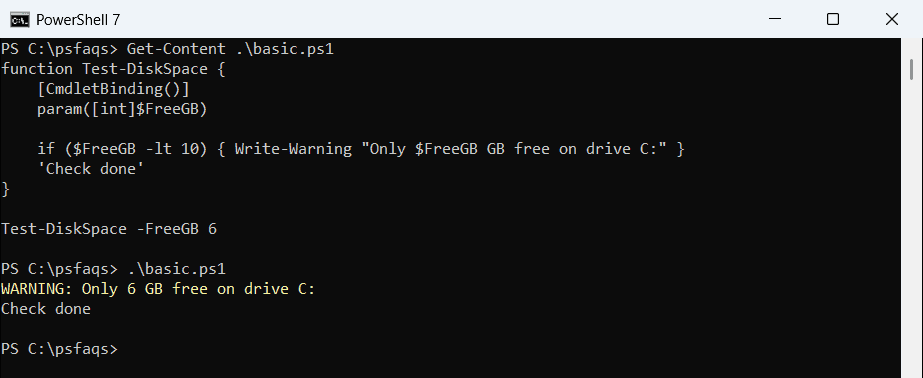
Check done still prints, because a warning never stops the script on its own. To build your own checks like this, see functions in PowerShell.
Hide warnings and capture them
-WarningAction SilentlyContinue hides the warning for one call. -WarningVariable still collects it, so you can log it later:
function Test-DiskSpace {
    [CmdletBinding()]
    param([int]$FreeGB)

    if ($FreeGB -lt 10) { Write-Warning "Only $FreeGB GB free on drive C:" }
    'Check done'
}

Test-DiskSpace -FreeGB 6 -WarningAction SilentlyContinue -WarningVariable diskWarnings
"Warnings captured: $($diskWarnings.Count)"
"First warning:     $($diskWarnings[0])"
Output:
Check done
Warnings captured: 1
First warning:     Only 6 GB free on drive C:
Name the variable without the $ sign in -WarningVariable. Add a plus sign, as in +diskWarnings, to append instead of overwrite. To keep them on disk, see writing to a log file.
Turn a warning into an error
-WarningAction Stop makes the warning stop the command, so try/catch can handle it:
function Test-DiskSpace {
    [CmdletBinding()]
    param([int]$FreeGB)

    if ($FreeGB -lt 10) { Write-Warning "Only $FreeGB GB free on drive C:" }
    'Check done'
}

try { Test-DiskSpace -FreeGB 6 -WarningAction Stop }
catch { "Caught: $($_.Exception.Message)" }
Output:
WARNING: Only 6 GB free on drive C:
Caught: The running command stopped because the preference variable "WarningPreference" or common parameter is set to Stop: Only 6 GB free on drive C: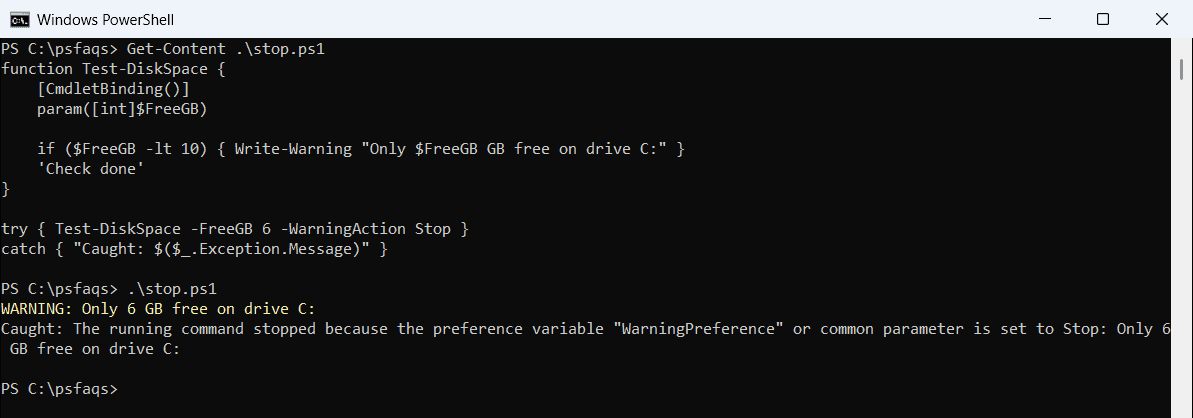
Notice the warning still prints before it stops. This is useful in automation, where a warning such as low disk space should end the job. More on catch blocks in PowerShell try catch.
Change the default with $WarningPreference
$WarningPreference sets the behavior for every command in the session. Setting it back to Continue shows warnings again:
function Test-DiskSpace {
    [CmdletBinding()]
    param([int]$FreeGB)

    if ($FreeGB -lt 10) { Write-Warning "Only $FreeGB GB free on drive C:" }
    'Check done'
}

$WarningPreference = 'SilentlyContinue'
Test-DiskSpace -FreeGB 6
$WarningPreference = 'Continue'
Test-DiskSpace -FreeGB 4
Output:
Check done
WARNING: Only 4 GB free on drive C:
Check done
The first call was silent and the second wasn’t. Prefer -WarningAction on single commands, because changing the preference variable affects everything that runs after it. Related automatic variables are in PowerShell error variables.
Redirect warnings with stream 3
Warnings are stream 3. 3>&1 merges them into normal output, and 3> writes them to a file:
function Test-DiskSpace {
    [CmdletBinding()]
    param([int]$FreeGB)

    if ($FreeGB -lt 10) { Write-Warning "Only $FreeGB GB free on drive C:" }
    'Check done'
}

$all = Test-DiskSpace -FreeGB 6 3>&1
$all | ForEach-Object { '{0,-14} {1}' -f $_.GetType().Name, $_ }

Test-DiskSpace -FreeGB 3 3> .\disk-warnings.txt | Out-Null
"In the file: $(Get-Content -Path .\disk-warnings.txt)"
Output:
WarningRecord  Only 6 GB free on drive C:
String         Check done
In the file: Only 3 GB free on drive C: