
To make PowerShell write to a file in UTF-8, add -Encoding utf8 to Out-File, Set-Content, or Add-Content:
Set-Content -Path .\notes.txt -Value 'Café in Austin' -Encoding utf8The catch is the byte order mark (BOM). PowerShell 7 writes that file without a BOM, while Windows PowerShell 5.1 always adds one. I’ll show both results byte by byte, plus the clean ways to get BOM-less UTF-8 in 5.1.
Write a file in UTF-8 with Out-File, Set-Content, and Add-Content
To see what really lands on disk, I use a tiny helper that prints the first bytes of a file. Save it as Get-FileBytes.ps1:
function Get-FileBytes ($Path, $Count = 4) {
    $bytes = [System.IO.File]::ReadAllBytes((Resolve-Path -Path $Path).Path)
    ($bytes[0..($Count - 1)] | ForEach-Object { '{0:X2}' -f $_ }) -join ' '
}
Now write the same line with all three cmdlets. The text includes an é, so a wrong encoding would show up right away:
. .\Get-FileBytes.ps1
$text = 'Café in Austin, TX'
$text | Out-File -FilePath .\Utf8\out-file.txt -Encoding utf8
Set-Content -Path .\Utf8\set-content.txt -Value $text -Encoding utf8
Add-Content -Path .\Utf8\add-content.txt -Value $text -Encoding utf8

'Out-File:    ' + (Get-FileBytes .\Utf8\out-file.txt)
'Set-Content: ' + (Get-FileBytes .\Utf8\set-content.txt)
'Add-Content: ' + (Get-FileBytes .\Utf8\add-content.txt)
Output:
Out-File:    43 61 66 C3
Set-Content: 43 61 66 C3
Add-Content: 43 61 66 C3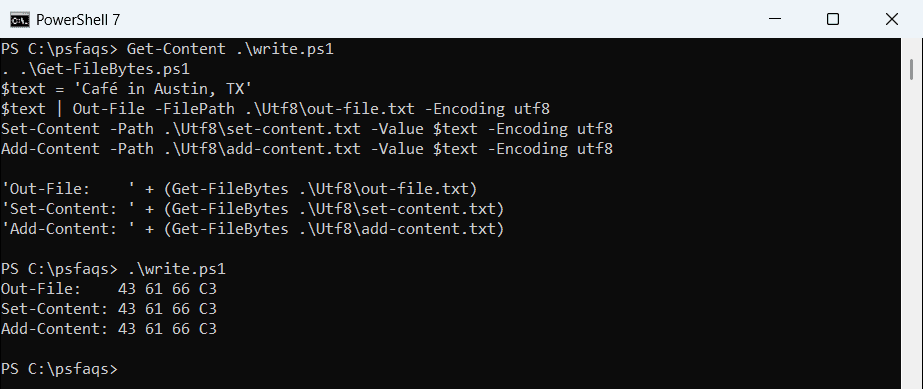
The output above is from PowerShell 7: every file starts with 43 61 66, the letters C, a, f. Windows PowerShell 5.1 printed EF BB BF 43 for all three, because its utf8 value means UTF-8 with a BOM.
Use Out-File for formatted command output and Set-Content for plain strings. To add lines to a log, Add-Content appends text without rewriting the file.
utf8 vs utf8NoBOM vs utf8BOM in PowerShell 7
PowerShell 7 gives you three UTF-8 values, so you can choose the BOM on purpose. This one only runs in PowerShell 7:
. .\Get-FileBytes.ps1
$text = 'Café in Denver, CO'
foreach ($enc in 'utf8', 'utf8NoBOM', 'utf8BOM') {
    Set-Content -Path ".\Utf8\$enc.txt" -Value $text -Encoding $enc
    '{0,-10} {1}' -f $enc, (Get-FileBytes ".\Utf8\$enc.txt" 5)
}
Output:
utf8       43 61 66 C3 A9
utf8NoBOM  43 61 66 C3 A9
utf8BOM    EF BB BF 43 61
Plain utf8 and utf8NoBOM produce identical bytes. Only utf8BOM writes the EF BB BF signature first.
Windows PowerShell 5.1 doesn’t know the newer names and refuses them:
try {
    'Café' | Set-Content -Path .\Utf8\menu.txt -Encoding utf8NoBOM -ErrorAction Stop
}
catch { "Failed. $($_.Exception.Message.Split('.')[0])." }
Output:
Failed. Cannot bind parameter 'Encoding'.If one script must run in both shells, check the PowerShell version first and pick the encoding in code. The table sums up what each value means:
| -Encoding value | PowerShell 7 | Windows PowerShell 5.1 |
|---|---|---|
| utf8 | UTF-8, no BOM | UTF-8 with BOM |
| utf8NoBOM | UTF-8, no BOM | Not supported (error) |
| utf8BOM | UTF-8 with BOM | Not supported (error) |
| (none) | UTF-8, no BOM | UTF-16LE for Out-File and >, ANSI for Set-Content |
What encoding does PowerShell use by default?
Leave out -Encoding and the two shells drift far apart. Here’s the same text written with Out-File, the > operator, and Set-Content:
. .\Get-FileBytes.ps1
$text = 'Café in Seattle, WA'
$text | Out-File -FilePath .\Utf8\out-file.txt
$text > .\Utf8\redirect.txt
$text | Set-Content -Path .\Utf8\set-content.txt

Get-ChildItem -Path .\Utf8\*.txt | ForEach-Object {
    '{0,-16} {1,3} bytes  {2}' -f $_.Name, $_.Length, (Get-FileBytes $_.FullName)
}
Output:
out-file.txt      22 bytes  43 61 66 C3
redirect.txt      22 bytes  43 61 66 C3
set-content.txt   22 bytes  43 61 66 C3