
PowerShell IndexOf returns the zero-based position of the first match, or -1 when there’s no match. It works on strings and on arrays:
'Salt Lake City, UT'.IndexOf(',')    # 14
[array]::IndexOf(@('Austin','Denver'), 'Denver')    # 1
In this tutorial, I’ll show PowerShell IndexOf on strings, arrays, lists and objects, with the case and culture traps I hit in PowerShell 7 and 5.1.
How does IndexOf work on a PowerShell string?
Pass a character or a substring, and optionally a start index. Positions count from 0:
$city = 'Salt Lake City, UT'
$city.IndexOf(',')
$city.IndexOf('Lake')
$city.IndexOf('Boise')
$city.IndexOf('a', 2)
if ($city.IndexOf('Salt') -ge 0) { 'Found Salt' }
Output:
14
5
-1
6
Found Salt
“Boise” isn’t there (-1), and the search from index 2 skips the first “a” and finds 6.
Compare the result with -ge 0, never as a plain if: a match at position 0 counts as false. For a yes/no answer, check if a string contains a substring instead.
Make IndexOf case-insensitive with StringComparison
Unlike -like and -match, IndexOf is case-sensitive. Add a StringComparison value to ignore case:
$place = 'Austin, Texas'
$place.IndexOf('texas')
$place.IndexOf('texas', [StringComparison]::OrdinalIgnoreCase)
Output:
-1
8
OrdinalIgnoreCase compares character codes. The string comparison options in PowerShell follow the same rules.
IndexOf differences between PowerShell 7 and 5.1
7 runs on modern .NET and 5.1 on .NET Framework, so two calls behave differently. One script, both shells:
$v = $PSVersionTable.PSVersion
"PowerShell $($v.Major).$($v.Minor)"
$name = 'Austin'
"[char] + IgnoreCase:   " + $name.IndexOf([char]'S', [StringComparison]::OrdinalIgnoreCase)
"[string] + IgnoreCase: " + $name.IndexOf('S', [StringComparison]::OrdinalIgnoreCase)
$zw = "Den$([char]0x200B)ver"
"Culture search:       " + $zw.IndexOf('nv')
"Ordinal search:       " + $zw.IndexOf('nv', [StringComparison]::Ordinal)
try { $null = $name.IndexOf('A', 7) }
catch { 'Failed.'; $_.Exception.InnerException.Message -split '(?<=\.) ' }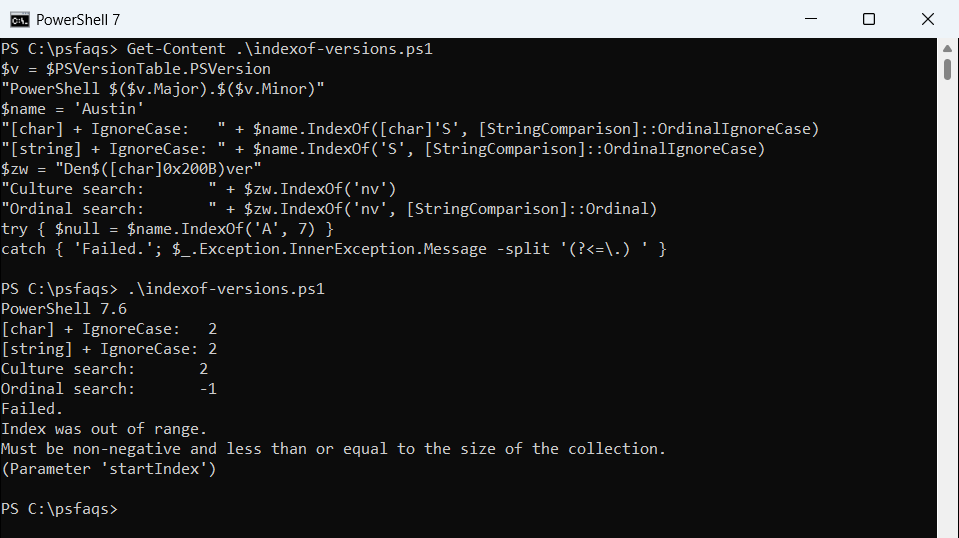
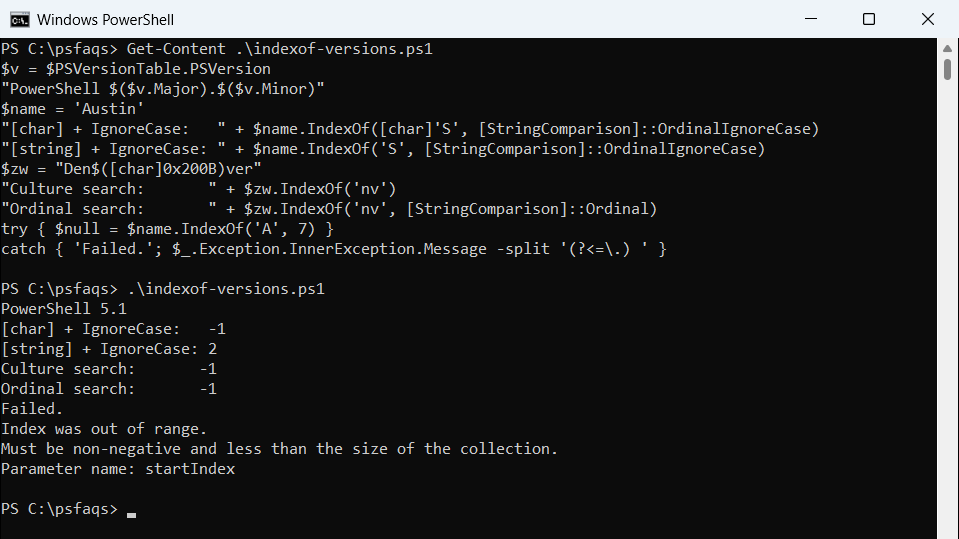
The [char] call returned -1 in 5.1 without an error. .NET Framework has no IndexOf(char, StringComparison), so PowerShell picked IndexOf(char, startIndex) and used the enum’s value 5 as the start.
A string search without StringComparison is culture-sensitive. PowerShell 7 ignored the hidden zero-width space and returned 2; 5.1 returned -1. Pass Ordinal when you need the same answer everywhere.