
To get the current function name in PowerShell, read $MyInvocation.MyCommand.Name inside the function. It returns the name of the command that’s running right now:
function Get-OrderTotal { $MyInvocation.MyCommand.Name } # Get-OrderTotalI’ll also cover script blocks, the caller’s name, aliases, script paths, logging, and two PowerShell 7 vs 5.1 differences.
Get the current function name with $MyInvocation.MyCommand.Name
$MyInvocation is an automatic variable that PowerShell fills for every script, function, and script block. Its MyCommand property describes the command itself:
function Get-OrderTotal {
    $name = $MyInvocation.MyCommand.Name
    "Running $name for order 1042"
}
Get-OrderTotal
Output:
Running Get-OrderTotal for order 1042The name isn’t hard-coded, so you can rename the function or copy the line into other PowerShell functions and the message stays correct.
Why the name changes in a script, function, or script block
$MyInvocation always describes the nearest command, so the same line returns different values depending on where it runs. I saved this as context.ps1 and ran it:
function Get-InvoiceStatus {
    'Function:     ' + $MyInvocation.MyCommand.Name
}
Get-InvoiceStatus
'Script:       ' + $MyInvocation.MyCommand.Name
& { 'Script block: [' + $MyInvocation.MyCommand.Name + ']' }
'Command type: ' + $MyInvocation.MyCommand.CommandType
Output:
Function:     Get-InvoiceStatus
Script:       context.ps1
Script block: []
Command type: ExternalScript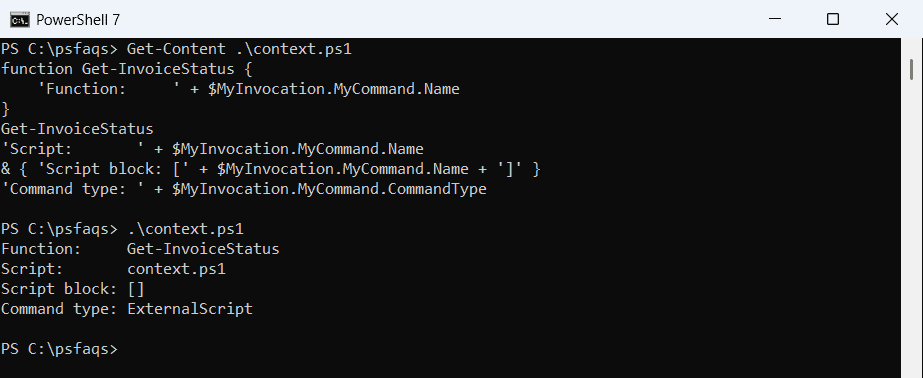
Inside the function it’s the function name, sent to the pipeline like any of the return values of a PowerShell function. At the script level it’s the file name, with a CommandType of ExternalScript.
An anonymous script block has no name, so you get an empty string.
Use $PSCmdlet.MyInvocation in advanced functions
An advanced function (one with [CmdletBinding()]) also gets $PSCmdlet, which has its own MyInvocation property. It points to the same command, so it’s handy in Write-Verbose messages:
function Set-ShippingRate {
    [CmdletBinding()]
    param([string]$State = 'TX')
    $name = $PSCmdlet.MyInvocation.MyCommand.Name
    Write-Verbose "$name started for $State"
    "$name set the rate for $State"
}
Set-ShippingRate -State CO -Verbose
Output:
VERBOSE: Set-ShippingRate started for CO
Set-ShippingRate set the rate for CO
The VERBOSE line only shows up because I passed -Verbose, which works like any switch parameter in PowerShell. Without it, you’d only see the second line.
How do I get the calling function name in PowerShell?
$MyInvocation only knows about the current command. To find out who called it, use Get-PSCallStack: index 0 is the current function, and index 1 is its caller:
function Get-CallerName {
    $stack = Get-PSCallStack
    '{0} was called by {1}' -f $stack[0].FunctionName, $stack[1].FunctionName
}
function Update-Inventory { Get-CallerName }
function Start-NightlyJob { Update-Inventory }

Start-NightlyJob
Get-CallerName
'---'
function Show-Stack {
    Get-PSCallStack | Select-Object -First 3 |
        ForEach-Object { '{0,-18} line {1}' -f $_.FunctionName, $_.ScriptLineNumber }
}
function Invoke-Payroll { Show-Stack }
Invoke-Payroll
Output:
Get-CallerName was called by Update-Inventory
Get-CallerName was called by <ScriptBlock>
---
Show-Stack         line 12
Invoke-Payroll     line 15
<ScriptBlock>      line 16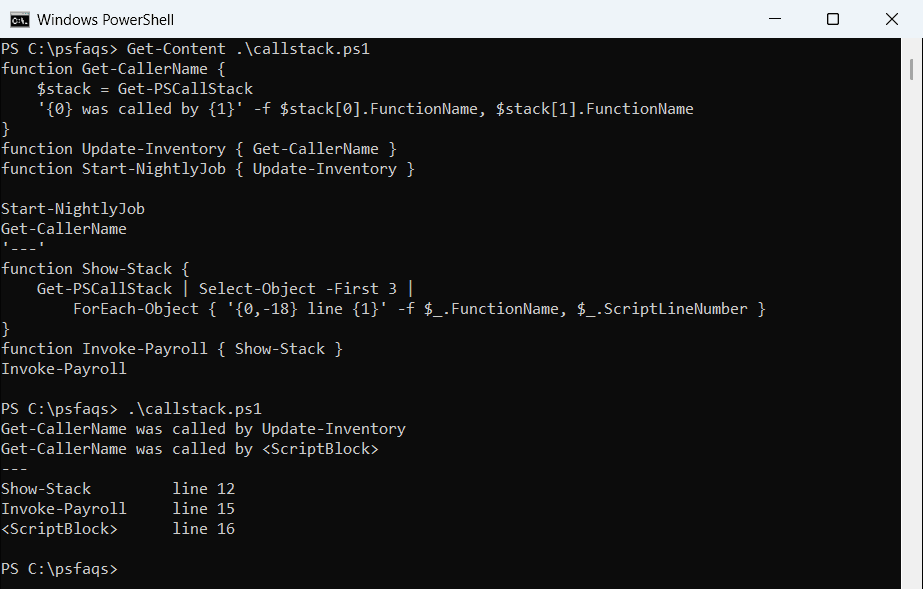
When the script calls the function directly, the caller is <ScriptBlock>, the top level of the file. Frames after that belong to whatever started the script and change with how you run it, so I kept the first three. Both shells printed the same stack.
The same frames appear in $_.ScriptStackTrace when you handle errors with try and catch, which helps when an error comes from deep inside nested functions.
InvocationName vs MyCommand.Name with aliases
$MyInvocation.InvocationName is the name the caller typed, while MyCommand.Name is the real function name. The difference shows up with aliases and the call operator:
function Get-CustomerReport {
    'Called as {0,-20} real name {1}' -f $MyInvocation.InvocationName, $MyInvocation.MyCommand.Name
}
Set-Alias -Name gcrep -Value Get-CustomerReport
Get-CustomerReport
gcrep
& (Get-Command Get-CustomerReport)
Output:
Called as Get-CustomerReport   real name Get-CustomerReport
Called as gcrep                real name Get-CustomerReport
Called as &                    real name Get-CustomerReport
Use MyCommand.Name for logs, since it never changes. InvocationName helps when a function should act differently per alias.
Get the current script name and path
For the script itself, use $PSCommandPath for the full path and $PSScriptRoot for the folder. Inside a function, $MyInvocation.MyCommand.Path is empty because MyCommand is the function:
function Show-ScriptInfo {
    'PSCommandPath:  ' + $PSCommandPath
    'ScriptName:     ' + $MyInvocation.ScriptName
    'MyCommand.Path: [' + $MyInvocation.MyCommand.Path + ']'
}
Show-ScriptInfo
'Script path:    ' + $MyInvocation.MyCommand.Path
'Script folder:  ' + $PSScriptRoot
'File name:      ' + (Split-Path -Path $PSCommandPath -Leaf)
Output:
PSCommandPath:  C:\psfaqs\paths.ps1
ScriptName:     C:\psfaqs\paths.ps1
MyCommand.Path: []
Script path:    C:\psfaqs\paths.ps1
Script folder:  C:\psfaqs
File name:      paths.ps1
Inside the function, $MyInvocation.ScriptName gives the file that holds the calling line. At the top level of the script, MyCommand.Path is the script file.
$PSScriptRoot is the reliable way to get the script’s own folder, even when you run the script from the command line in another folder.
Add the function name to log messages
A small Write-