
To convert HTML to JSON in PowerShell, pull the data out of the HTML into objects first, then pipe the objects to ConvertTo-Json. For a clean table, the quickest way is to cast the HTML to [xml]:
$table = [xml](Get-Content -Path .\stores.html -Raw)
$table.table.tr | Select-Object -Skip 1 | ForEach-Object { [pscustomobject]@{ Store = $_.td[0]; City = $_.td[1] } } | ConvertTo-Json
Real web pages are rarely clean enough for that. Below I cover the [xml] route, why it breaks on everyday HTML, and a small function that turns any simple table into JSON.
Everything runs on local files with no extra modules, in PowerShell 7 and Windows PowerShell 5.1.
Convert a clean HTML table with [xml]
My stores.html is a small, well-formed table, like the ones ConvertTo-Html produces. [xml] turns it into objects with tr and td properties:
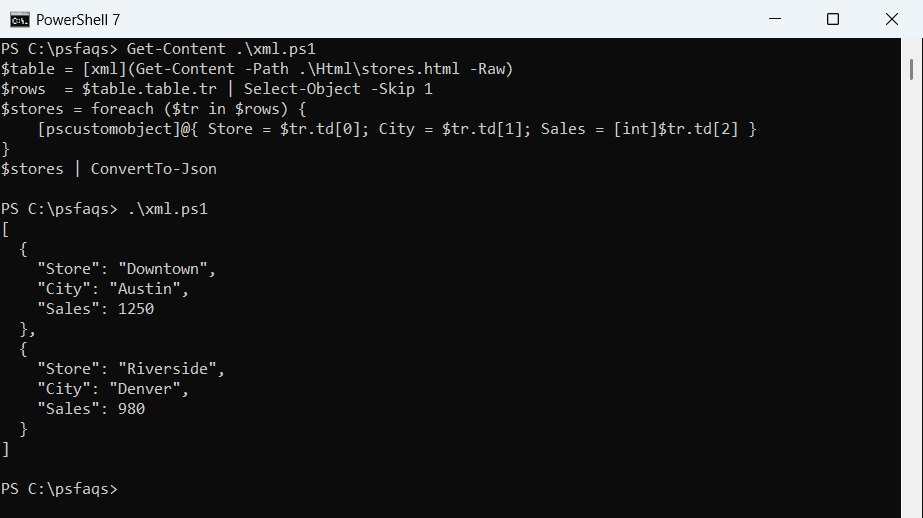
$table = [xml](Get-Content -Path .\Html\stores.html -Raw)
$rows  = $table.table.tr | Select-Object -Skip 1
$stores = foreach ($tr in $rows) {
    [pscustomobject]@{ Store = $tr.td[0]; City = $tr.td[1]; Sales = [int]$tr.td[2] }
}
$stores | ConvertTo-Json
Output:
[
  {
    "Store": "Downtown",
    "City": "Austin",
    "Sales": 1250
  },
  {
    "Store": "Riverside",
    "City": "Denver",
    "Sales": 980
  }
]
Cast numbers yourself, as with [int] here, or they end up as strings in the JSON. If your table came from ConvertTo-Html, see creating an HTML table in PowerShell.
Why [xml] fails on real web pages
HTML allows things XML doesn’t, like a <br> without a closing tag or a <p> that’s never closed. My report.html has both, and [xml] gives up:
try   { $page = [xml](Get-Content -Path .\Html\report.html -Raw) }
catch { "Failed. " + ($_.Exception.Message -split '\. Error: ')[1] }
Output:
Failed. "The 'br' start tag on line 12 position 18 does not match the end tag of 'td'. Line 12, position 28."Windows PowerShell 5.1 used to offer Invoke-WebRequest with ParsedHtml for this, but it depends on Internet Explorer and doesn’t exist in PowerShell 7. A small regex function works in both. More on regex is in PowerShell regex.
A ConvertFrom-HtmlTable function
This function finds the rows, uses the <th> cells as property names, strips tags inside cells, decodes entities like & and turns numbers like 1,250 into real numbers:
function ConvertFrom-HtmlTable ([string]$Html) {
    $clean = { param($s) [System.Net.WebUtility]::HtmlDecode(($s -replace '<br\s*/?>', ' ' -replace '<[^>]+>', '').Trim()) }
    $rows = [regex]::Matches($Html, '(?s)<tr[^>]*>(.*?)</tr>') | ForEach-Object { $_.Groups[1].Value }
    $head = [regex]::Matches($rows[0], '(?s)<th[^>]*>(.*?)</th>') | ForEach-Object { & $clean $_.Groups[1].Value }
    foreach ($row in $rows | Select-Object -Skip 1) {
        $cells = @([regex]::Matches($row, '(?s)<td[^>]*>(.*?)</td>') | ForEach-Object { & $clean $_.Groups[1].Value })
        $obj = [ordered]@{}
        for ($i = 0; $i -lt $head.Count; $i++) {
            $v = $cells[$i]
            if ($v -match '^-?[\d,]+$')            { $v = [long]($v -replace ',', '') }
            elseif ($v -match '^-?[\d,]+\.\d+$') { $v = [decimal]($v -replace ',', '') }
            $obj[$head[$i]] = $v
        }
        [pscustomobject]$obj
    }
}
report.html has two tables, so I pick the one with id=”stores” first and pass only that:
. .\ConvertFrom-HtmlTable.ps1
$html  = Get-Content -Path .\Html\report.html -Raw
$table = [regex]::Match($html, '(?s)<table[^>]*id="stores"[^>]*>.*?</table>').Value

ConvertFrom-HtmlTable $table | ConvertTo-Json -Compress
Output:
[{"Store":"Downtown","City":"Austin","Sales":1250},{"Store":"Riverside & Main","City":"Denver","Sales":980},{"Store":"Harbor Point","City":"Seattle","Sales":1105}]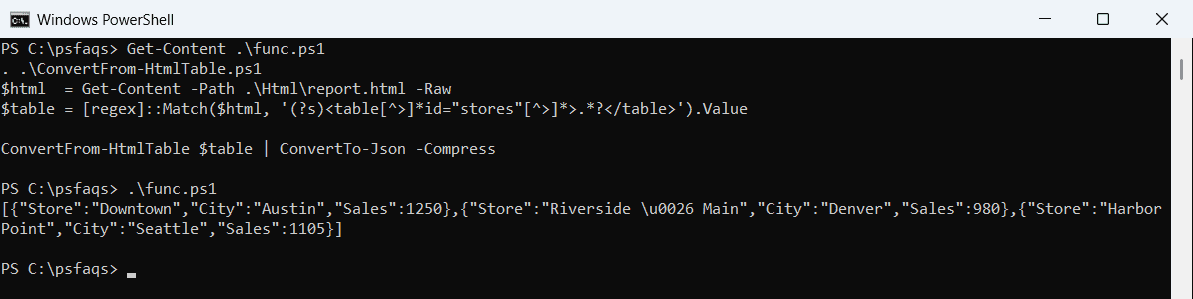
Riverside & Main became Riverside & Main, and Harbor<br>Point became Harbor Point. -Compress puts the JSON on one line. Windows PowerShell 5.1 writes the & as \u0026, which is valid JSON and reads back as &. For the -Compress and -Depth options, see PowerShell ConvertTo-Json.
Regex is fine for simple tables you know. It can’t handle tables nested inside cells or merged cells with colspan, so use a real HTML parser module for those.
Convert an HTML list to a JSON array
Lists are simpler than tables. Grab the <li> items from one <ul> and pass them with -InputObject:
$html  = Get-Content -Path .\Html\report.html -Raw
$list  = [regex]::Match($html, '(?s)<ul[^>]*id="todo"[^>]*>(.*?)</ul>').Groups[1].Value
$items = [regex]::Matches($list, '(?s)<li[^>]*>(.*?)</li>') | ForEach-Object { [System.Net.WebUtility]::HtmlDecode($_.Groups[1].Value) }

ConvertTo-Json -InputObject @($items) -Compress
Output:
["Order shelves","Hire 2 cashiers","Fix FAQ page"]-InputObject with @() keeps the brackets even when the list has a single item. To work with the array afterward, see reading a JSON file into an array.
Save the JSON to a file
Write the result with Set-Content and read it back to make sure the numbers survived:
. .\ConvertFrom-HtmlTable.ps1
$html  = Get-Content -Path .\Html\report.html -Raw
$table = [regex]::Match($html, '(?s)<table[^>]*id="stores"[^>]*>.*?</table>').Value

ConvertFrom-HtmlTable $table | ConvertTo-Json | Set-Content -Path .\Html\stores.json -Encoding utf8
$back = Get-Content -Path .\Html\stores.json -Raw | ConvertFrom-Json
"Saved $($back.Count) stores, total sales $(($back | Measure-Object -Property Sales -Sum).Sum)"
$back | Format-Table
Output:
Saved 3 stores, total sales 3335

Store            City    Sales
-----            ----    -----
Downtown         Austin   1250
Riverside & Main Denver    980
Harbor Point     Seattle  1105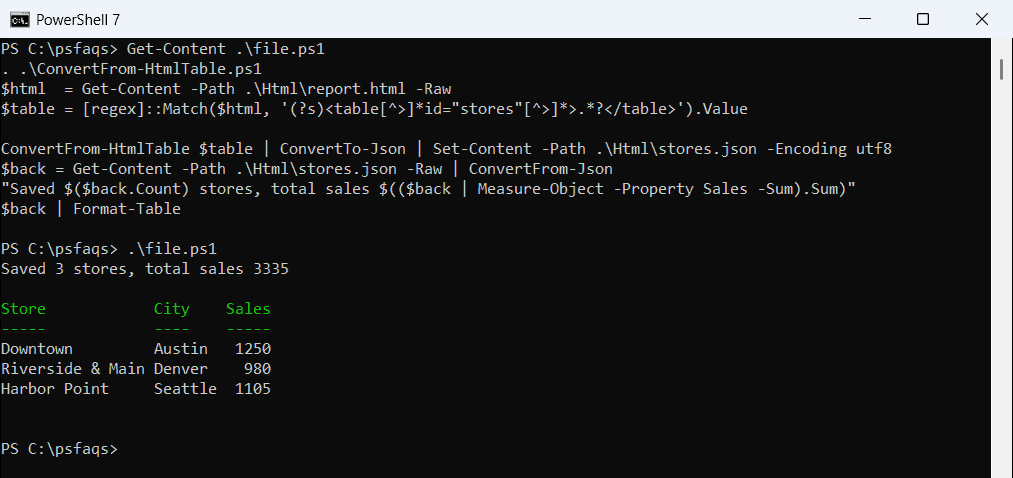
Sales came back as numbers, so Measure-Object can total them. Writing JSON files is covered in writing JSON to a file.