
To run a PowerShell script on a remote computer, use Invoke-Command with -ComputerName and either a scriptblock or -FilePath. This one line sends a local .ps1 file to a sales PC and runs it there:
Invoke-Command -ComputerName SALES-PC01 -FilePath C:\Scripts\Get-DiskReport.ps1In this tutorial, I’ll show you how Invoke-Command in PowerShell works with one or many computers, how to pass local values, reuse sessions, run jobs, and fix the WinRM errors you’ll hit first.
My test PC has no remote target and remoting is off, so remote examples are code only. Every output shown is real, from PowerShell 7.6 and Windows PowerShell 5.1.
Run a command on a remote computer with -ComputerName
-ComputerName takes one or more computer names, IP addresses or fully qualified names. -ScriptBlock holds the code that runs on the other side. This checks the print spooler on one PC:
Invoke-Command -ComputerName SALES-PC01 -ScriptBlock {
    Get-Service -Name Spooler | Select-Object -Property Name, Status
}
Invoke-Command opens a temporary connection, runs the block, returns the results and closes it.
The same pattern powers small admin tasks like finding the logged-on user on a remote computer. Its short alias is icm.
Invoke-Command -ScriptBlock on the local computer
Leave out -ComputerName and Invoke-Command runs the scriptblock right here, with no remoting at all. Microsoft’s docs say it runs in a child scope, and this test shows what that means:
Invoke-Command -ScriptBlock { "Edition: $($PSVersionTable.PSEdition)" }

$status = 'Not started'
Invoke-Command -ScriptBlock { $status = 'Done' }
"Child scope: $status"
Invoke-Command -ScriptBlock { $status = 'Done' } -NoNewScope
"NoNewScope:  $status"
Output:
Edition: Core
Child scope: Not started
NoNewScope:  Done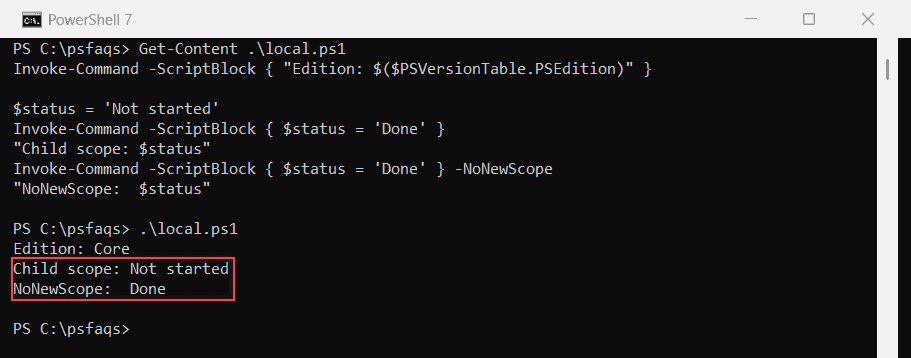
The output above is from PowerShell 7, which reports the Core edition. Windows PowerShell 5.1 printed “Edition: Desktop” and the same two scope lines.
A variable set inside the block disappears when the block ends, unless you add -NoNewScope. That switch only works for local runs. Global variables in PowerShell explain scopes in more detail.
One trap: -ComputerName localhost isn’t a local run. It uses remoting, so it needs WinRM and an elevated window.
Run a local script on a remote computer with -FilePath
For anything longer than a few lines, keep the code in a .ps1 file on your computer. -FilePath reads the file, turns it into a scriptblock and sends it, so the remote PC never needs a copy:
Invoke-Command -ComputerName SALES-PC01 -FilePath C:\Scripts\Clear-TempFiles.ps1 -ArgumentList 30The 30 goes to the script’s first parameter through -ArgumentList, the same way you’d run a script with parameters from the command line. Values bind by position, not by name.
In my tests, -FilePath without -ComputerName or -Session failed with “Parameter set cannot be resolved”. It’s a