
To exit a PowerShell script, use the exit keyword, optionally with an exit code such as exit 2. The script stops on that line, and the caller reads the number from $LASTEXITCODE. Here’s Check-Backup.ps1:
$folder = Join-Path -Path $PSScriptRoot -ChildPath 'Backups'
if (-not (Test-Path -Path $folder)) {
    'Backup folder not found. Stopping.'
    exit 2
}
'Backup folder found.'
exit 0
Without a Backups folder, it stops early:
.\Check-Backup.ps1
"Exit code: $LASTEXITCODE"
Output:
Backup folder not found. Stopping.
Exit code: 2
In this tutorial, I’ll show you how to exit a PowerShell script with exit, return, break and throw, how exit codes reach the caller, and where PowerShell 7 and Windows PowerShell 5.1 behave differently.
Exit a PowerShell script with the exit keyword
exit ends the script right where it runs. Nothing after it executes, so it usually sits inside an if statement that checks a condition.
Run the same script twice, first without the folder and then with it:
.\Check-Backup.ps1
"Exit code: $LASTEXITCODE, succeeded: $?"
New-Item -Path .\Backups -ItemType Directory | Out-Null
.\Check-Backup.ps1
"Exit code: $LASTEXITCODE, succeeded: $?"
Output:
Backup folder not found. Stopping.
Exit code: 2, succeeded: False
Backup folder found.
Exit code: 0, succeeded: True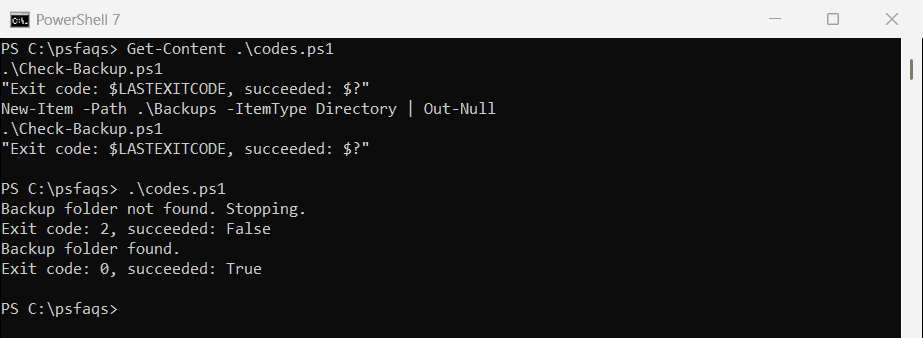
The first run printed exit code 2 and $? was False. After New-Item created the folder, the script reached exit 0, so both values flipped.
Why end with exit 0? A script you call directly doesn’t reset $LASTEXITCODE on its own, so without it the old 2 would still be there.
exit vs return vs break vs throw
All four can stop code, but they stop different things:
| Keyword | What it stops | Exit code with -File |
|---|---|---|
exit | The whole script, even from inside a function | The number you pass (0 by default) |
return | The current function or script block | 0 |
break | The nearest loop or switch, even one in the caller | 0 |
throw | The script, unless try/catch handles the error | 1 |
Pick exit for a script, and return for PowerShell functions that should hand control back.
How do you exit a function without stopping the script?
Use return. It leaves the current function, and the script carries on with the next line:
function Get-CityTotal {
    param([string]$City, [decimal[]]$Orders)
    if ($Orders.Count -eq 0) {
        "No orders for $City, skipping."
        return
    }
    '{0}: {1:C2}' -f $City, ($Orders | Measure-Object -Sum).Sum
}
Get-CityTotal -City 'Austin' -Orders 120.50, 89.99
Get-CityTotal -City 'Denver' -Orders @()
Get-CityTotal -City 'Seattle' -Orders 45.00
'Report complete.'
Output:
Austin: $210.49
No orders for Denver, skipping.
Seattle: $45.00
Report complete.
Denver had no orders, so the function returned early, and Seattle still ran. You can also pass a value, as shown in returning values from PowerShell functions.
Put exit in that function instead and the whole script stops. Sync-Reports.ps1 calls exit 4 for Denver:
function Sync-CityReport {
    param([string]$City)
    if ($City -eq 'Denver') {
        "No report for $City. Stopping the script."
        exit 4
    }
    "Synced $City"
}
foreach ($city in 'Austin', 'Denver', 'Seattle') {
    Sync-CityReport -City $city
}
'All reports synced.'
.\Sync-Reports.ps1
"Exit code: $LASTEXITCODE"Output:
Synced Austin
No report for Denver. Stopping the script.
Exit code: 4