
PowerShell doesn’t ship a grep command, but Select-String does the same job. Give it a pattern and a file, and it returns every matching line, the way grep in PowerShell should:
Select-String -Pattern 'ERROR' -Path C:\psfaqs\WebLogs\app.logBelow, I map the grep options you already know to Select-String parameters and run each one on a sample log. Every result came from PowerShell 7.6 and Windows PowerShell 5.1, and I call out where the two differ.
Use Select-String like grep on a file
Here’s the sample log, saved as C:\psfaqs\WebLogs\app.log. A second file, Archive\web.log, sits in a subfolder for the recursive searches later:
2026-10-19 08:00:01 INFO  Service started on WEB01
2026-10-19 08:05:12 WARN  Disk C: at 85% on WEB01
2026-10-19 08:07:45 ERROR Connection to SQL01 failed: timeout after 30s
2026-10-19 08:07:46 INFO  Retrying connection to SQL01
2026-10-19 08:07:50 ERROR Connection to SQL02 failed: login failed for svc-app
2026-10-19 08:10:00 INFO  Request from 10.0.4.21 to 10.0.4.35 completed
2026-10-19 08:11:15 INFO  Invoice 1042 total $25.00 sent
2026-10-19 08:12:30 INFO  Errors reset by admin
Now the first search, the PowerShell version of grep ERROR app.log:
Select-String -Path C:\psfaqs\WebLogs\app.log -Pattern 'ERROR'Output:
C:\psfaqs\WebLogs\app.log:3:2026-10-19 08:07:45 ERROR Connection to SQL01 failed: timeout after 30s
C:\psfaqs\WebLogs\app.log:5:2026-10-19 08:07:50 ERROR Connection to SQL02 failed: login failed for svc-app
C:\psfaqs\WebLogs\app.log:8:2026-10-19 08:12:30 INFO  Errors reset by admin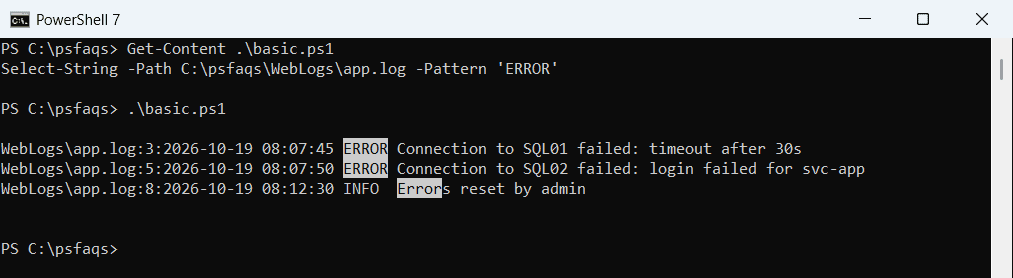
Each result shows the path, the line number and the line, so you get grep -n for free. The path is shortened when the file sits under your current folder, as in the screenshot.
Look at the last result. Errors reset matched because Select-String ignores case, while grep is case-sensitive by default. If you only need the line text, here’s how to find a string and return just the line.
grep options and their Select-String equivalents
Most grep flags have a direct match. The pattern is a .NET regular expression in PowerShell, much like grep -E:
| grep | What it does | Select-String equivalent |
|---|---|---|
grep text file | Search a file | Select-String -Pattern text -Path file |
-i | Ignore case | Default (add -CaseSensitive for grep’s default) |
-v | Lines that don’t match | -NotMatch |
-w | Whole word | -Pattern '\bword\b' |
-F | Plain text, no regex | -SimpleMatch |
-e a -e b |