
The PowerShell escape character is the backtick (`), the key just below Esc on a US keyboard. Inside double quotes, a backtick makes the next character literal, like `$, or turns it into a special character, like `t for a tab:
$name = 'Maria'

"Hi $name, your total is `$25."
"She said `"approved`" at 9 AM."
"Name:`tMaria Lopez"
'It''s already approved.'
"Folder: C:\Temp\new"
Output:
Hi Maria, your total is $25.
She said "approved" at 9 AM.
Name:	Maria Lopez
It's already approved.
Folder: C:\Temp\new
A backslash is just a normal character in PowerShell, so Windows paths need no escaping. Single quotes are the other shortcut, because nothing inside them is special.
In this tutorial, I’ll explain how the PowerShell escape character works, list every escape sequence, and show how to escape dollar signs, quotes, regex characters, brackets, URLs and JSON. I tested everything in PowerShell 7.6 and Windows PowerShell 5.1.
What is the escape character in PowerShell?
It’s the backtick, which Microsoft also calls the grave accent (ASCII 96). Escape sequences are case-sensitive, and PowerShell only reads them inside double-quoted strings.
A backtick in front of an ordinary letter simply disappears, and two backticks give you one literal backtick. Single quotes ignore the backtick completely:
"Unknown sequence: `q`z"
"Literal backtick: ``n and ``"
'Single quotes:    `n `t `$HOME'
"Mixed: It's `$5 for a `"special`" order"
Output:
Unknown sequence: qz
Literal backtick: `n and `
Single quotes:    `n `t `$HOME
Mixed: It's $5 for a "special" order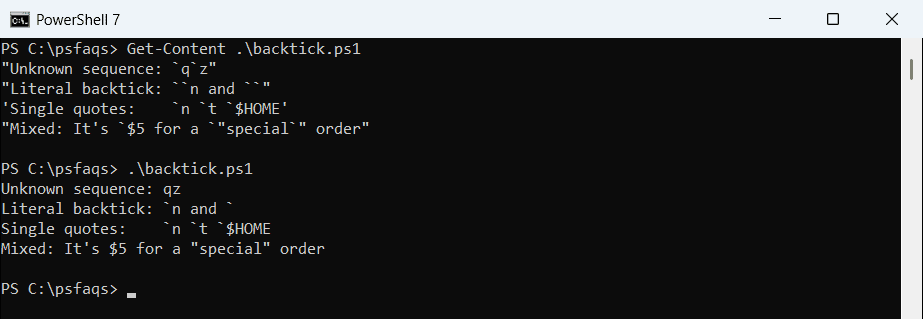
If you’re coming from cmd.exe, the caret (^) won’t work here, and neither will the backslash from C# or JSON. The differences between PowerShell and CMD go well beyond this one character.
PowerShell escape sequences: `n, `t, `e, `u and more
A backtick before certain letters inserts a character you can’t easily type. Here’s the full list:
| Sequence | Character | Code | Windows PowerShell 5.1 |
|---|---|---|---|
`0 | Null | 0 | Yes |
`a | Alert (beep) | 7 | Yes |
`b | Backspace | 8 | Yes |
`e | Escape (for ANSI colors) | 27 | No, PowerShell 6+ |
`f | Form feed | 12 | Yes |
`n | New line | 10 | Yes |
`r | Carriage return | 13 | Yes |
`t | Horizontal tab | 9 | Yes |
`u{x} | Any Unicode character by hex code | x | No, PowerShell 6+ |
`v | Vertical tab | 11 | Yes |
To see exactly what each sequence produces, this script pr